
What is Node-RED for Domino?
There has been a lot of talk with the arrival of Domino 10 about Node.js and how it will upgrade Domino apps with ease.
One solution that has been suggested, especially for those of us who are not Node.js experts is Node-RED.
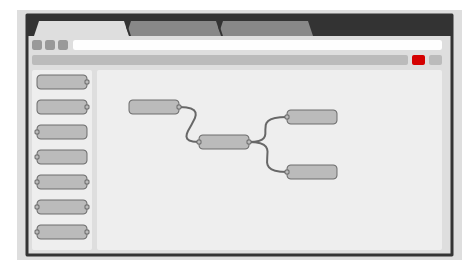
Let’s see what Node-RED promises to do: it wires together hardware devices APIs and online services. The flows and authentication are held in JSON. Two other things that are great, is that it’s event-driven and it also comes with a browser-based flow editor.
Image Source: https://nodered.org/#features
Here is why Node-RED is a good idea:
-
Low code – because it works with nodes, code writing is brought to a minimum.
-
Easy install and run – because it is built on Node.js, you can easily run at the edge of the network on low-cost hardware such as the Raspberry Pi as well as in the cloud.
-
Coding is as easy as can be, so even somebody who does not have all that much experience with development should be able to write decent code.
-
Easy to share solutions – The flows created in Node-RED are stored using JSON which can be easily imported and exported for sharing with others.
-
Library with ready-made integrations points – A built-in library allows you to save useful functions, templates or flows for re-use.
Why it’s a good thing for Domino? Since it’s the tool used by Domino to abstract the use of the standard APIs exposed by the “domino-db NPM package.”, it comes in really handy. Also, you can add:
-
it has lots of third-party add-ons
-
It simplifies integration
-
It offers dashboards
-
You can easily schedule JavaScript functions
You can use it on Node.js, Linux is preferred but support for Windows is also provided. As far as cloud goes, make your pick: AWS, IBM Cloud, MS Azure.
You now might have a new question in mind: What are these Nodes you are talking about? Well, nodes are asynchronous black boxes that can use flow, sub-flow global and configuration objects. A node will pass data in a msg object. The flows and authentication are held in JSON and they code with HTML and JavaScript.
Let’s now dive deeper into the matter by addressing the issue of installing it. Here are some links that can help you with the local installation: Getting Started and Installing on Windows ).
To install Node.js you’ll first need to get it from https://nodejs.org/en/. Run the installation as an administrator, accept de defaults and that is it.
To install Node-RED you’ll need to run cmd, execute: npm install -g –undafe-perm node-red, Run “node-red”. At this step Node-RED will create a new folder in your %HOMEPATH% folder called .nde-red. You’ll need to point a local browser at http://localhost:1880.
You can now start with your app development. 🙂
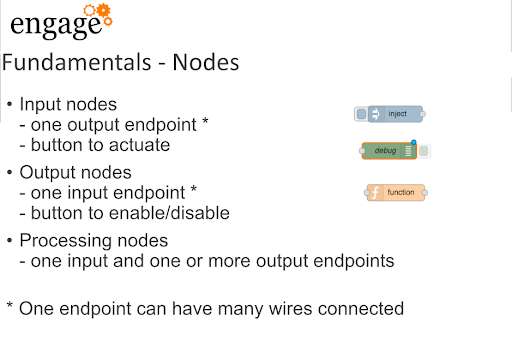
Here is the link to the great presentation on Node-RED from Paul Withers and Fredrik Malmborg at Engage 2019.
To help you with your work, here are some Nodes fundamentals:
Input nodes one output endpoint (one endpoint can have many wires connected) button to actuate Output nodes one input endpoint button to enable/disable Processing nodes one input and one or more output endpoints
-msg.payload
Node-RED nodes consume input messages and produce output messages. Messages are JavaScript objects that contain at least a “payload” parameter msg = { payload: “message payload” };
Fundamentals – input nodes
Inject: injects a message on clicking the button, or by schedule. HTTP: acts as a basic webserver Websocket MQTT TCP UDP Serial in
Fundamentals – output nodes
The input nodes have a corresponding output node of the same type. Debug: used to catch and display messages.
Fundamentals – function node
A function node uses the input message to produce one or more output messages. if (msg.payload ===”Domino”) { msg.payload = “You should use Domino!” }else { msg.payload = “You should ” } return msg;
Fundamentals – some processing nodes Switch: easily route messages depending on the properties of the input. HTTP request: a request to a URL with the method you choose (GET, PUT, etc). Change: configurable rules for manipulating the message, including search and replace. CSV: converting to and from CSV. JSON: converting to and from JSON. XML: converting to and from XML.
Filed under hcl domino