
What's New in HCL Nomad: Highlights from CollabSphere 2020

As of December 8th HCL Nomad is in public beta! We can all give it a try and see what great capabilities it has and how it can help make our work so much easier. You can sign up HERE!
What is HCL Nomad?
HCL Nomad is a mobile client that allows users to work with Domino applications from their mobile devices right out of the box. Here are some of the features:
-
HCL Notes Client cross compiled for mobile with enhancements for usability
-
Comparable to HCL Client for Application Access (HCAA)
-
Support of @Formulas and LotusScript
-
Local Replicas enable working offline
-
Field level security and encryption
-
No specific design modifications required, but you might still want to review your apps.
Managing Nomad also comes rather easy:
-
Marvel Client Implementation
-
It comes with Marvel Client installed
-
Easy to extend any existing configurations to HCL Nomad
-
The client is configured from the very first launch
-
Manage
-
Recent apps
-
Local replicas
-
Connections documents
-
HCL Nomad app restrictions
-
Analyze
-
Over 100 Client and OS properties, desktop icons, local databases, notes.ini.
When it comes to deployment you get Enterprise Mobility Management:
-
Basic Settings – Deployment
-
Domino server
-
Domino server host name
-
Username
-
Lock Account Settings
-
Restrictions – Data loss prevention
-
Mail
-
Replication
-
Cut, Copy, Paste
-
Import
-
Advanced Settings – Performance, Specific Requests
-
Connection Documents
-
Passthru Documents
-
Feature Availability
-
Available today for iOS via App Config!
-
Available soon for Android via Android Enterprise.
New Features in HCL Nomad:
Biometric Authentication
-
Simply and securely unlock your Notes ID: Face ID, Touch ID, Backed by Device Passcode;
-
Requires a device Passcode and Face ID / Touch ID to be enabled on the device
-
Available Now (iOS release v1.0.9) + soon on Android
-
Admin Setting: enableBiometricSetup (Default TRUE)
Text selection for Documents in Read Mode
-
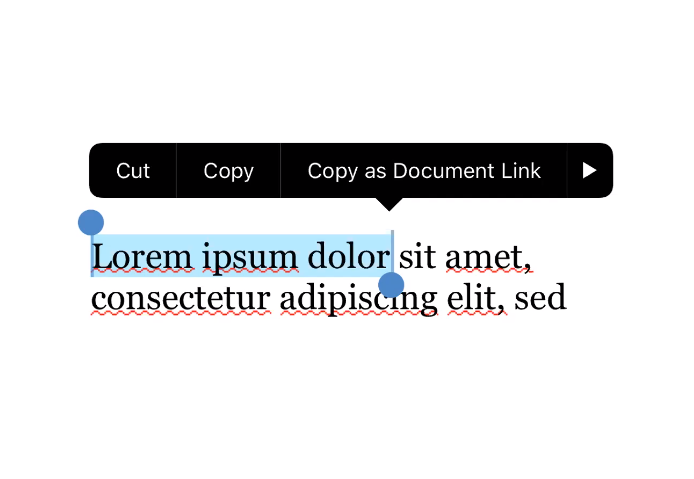
Select text when reading a document using the same text selection gestures native to the platform;
-
On iOS and Android long press on a word to create the text selection anchors;
-
Drag the anchors to make your selection;
-
Perform basic text operations on the selected text.
Domino Designer Enhancements for Mobile:
Designer V12 Responsive Application Changes
-
@ResolutionWidth – current NotesUIDocument resolution width in Notes pixels
-
@ResolutionHeight – current NotesUIDocument resolution height in Notes pixels
-
@Command ([RelayoutWindow]) – invokes a relayout of the application window
-
New Form / View events for Resolution change
Designer V11 Changes for Mobile
-
Mobile Hides When
-
Hide unnecessary content from mobile: Hide action from Mobile, Hide column from Mobile, Hide paragraph from Mobile;
-
Mobile Frame Sequence
-
Sequence only necessary frames
-
Order the frames sensibility
-
Frames can be sequenced 1-15
-
Nomad creates a frameset sequence by default when a sequence is not explicitly defined by the designer.

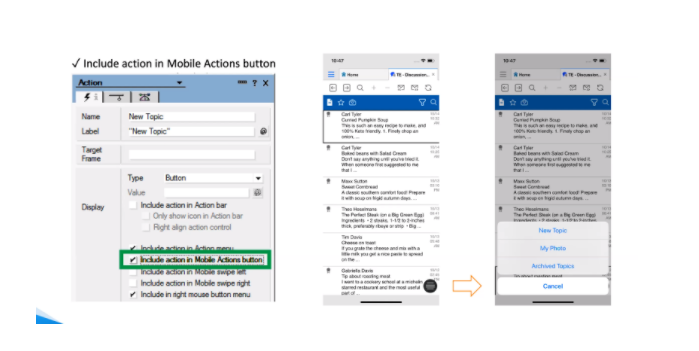
- Mobile Action Button
Nomad Proxy
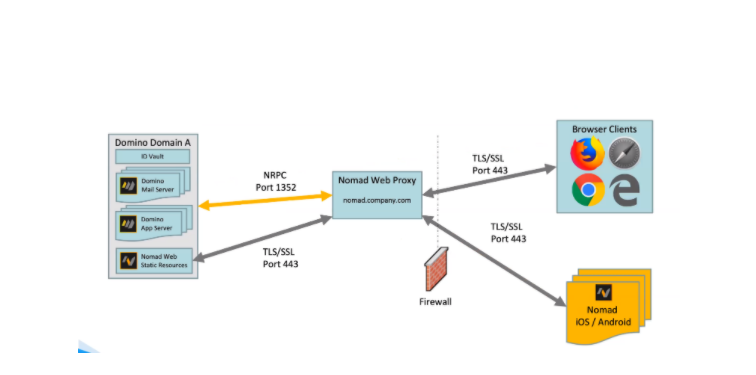
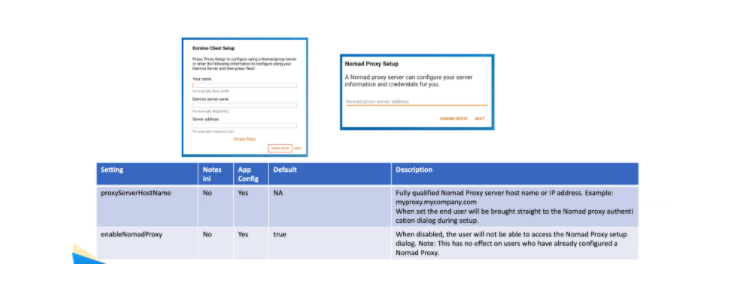
Top ease the access to servers and make them secure, Nomad now also has the option of Nomad Proxy:
Nomad Proxy Support on Mobile
-
Available on Android now starting with version 1.0.9
-
Available on iOS in the next release v1.0.10
Nomad Web
Deployment Requirements:
-
Server Infrastructure
-
Deploy 1 (or more) instances of Nomad Web Proxy Server
-
Deploy Nomad WASM static resources on a Domino Web Server
-
No requirement to upgrade Domino Servers to V11
-
ID Vault deployed
-
Browser
-
Firefox, Chrome
What’s new in Nomad web
-
Automatic Nomad Configuration
-
Safelink Proxy Integration
-
Two Factor Authentication
-
Nomad User Name Detection
-
New React based User Interface
-
New Password Dialog
-
Message Box(es)
If you have registered for Collabsphere you can access the recording of this great session by just login into your account.
Filed under hcl domino, hcl nomad