
Volt MX Curie Release: New Features & Enhancements Unveiled

On January 17th HCL organized a great webinar to tell us all about the new and improved HCL Volt MX Curie. Let’s check what is new with this installment.
What is Volt MX
HCL Volt MX is HCL’s solution to get your applications up and running as fast as possible. Not only will development time drop when using Volt but you will be able to create apps for multiple devices with no extra development needed.
What’s new in Curie
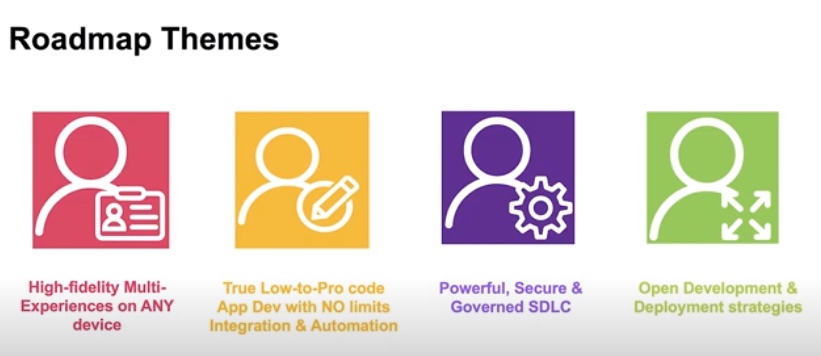
As expected, this new installment of Volt MX comes with a sum of great things. Here are the Roadmap Themes HCL had in mind:
In order to make the installments easier to remember, HCL choose some code names for the next releases:

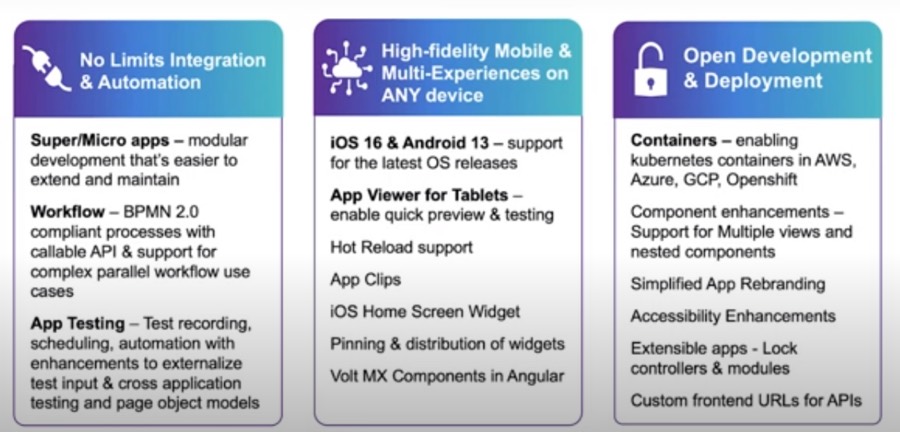
Here is a quick look at what Volt MX Curie is bringing new to the table:
Micro Apps
In order to help developers with their productivity, HCL Volt MX Curie comes with some Super and Micro Apps as well as some other components.
Micro Apps provide Packaged Business Capabilities that fully encapsulate a feature set for a specific business function or user scenario.
-
Combine Micro Apps into larger Composite Applications
-
Easily Drop in new functionality via Micro App Packages for faster releases
-
Target upgrades to specific Micro Apps to simplify maintenance
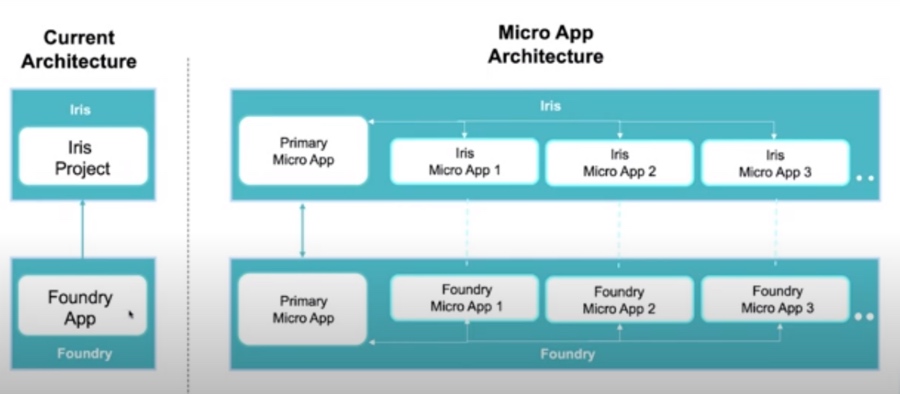
Let’s see how HCL Volt’s architecture changes with the introduction of Micro Apps:
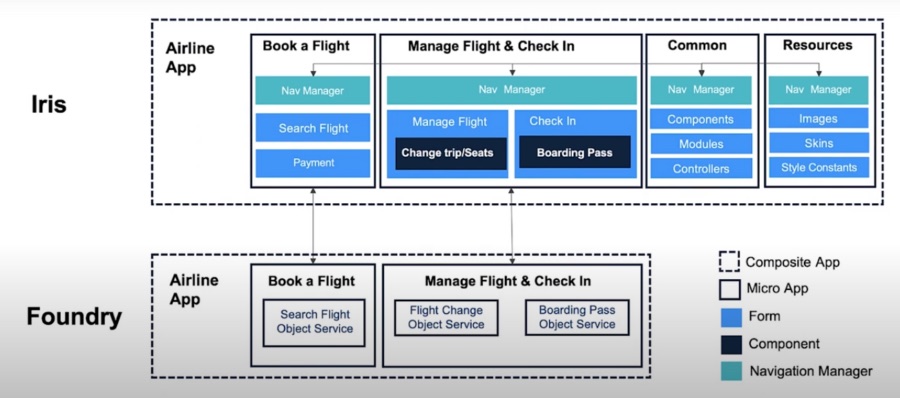
A sample of how Micro Apps work on an application for an airline:
HCL Volt MX Curie Micro Apps Feature List:
-
Open a single Micro App project for focused dev/test
-
Combine multiple Micro Apps into a Composite App project
-
Manage backend Foundry services at the Micro App level
-
Use the Navigation Manager to control integration between Micro Apps
-
Selectively Build a Subset of Micro Apps
-
Define Resource Sharing between Micro Apps
-
Package wearables logic in a micro app architecture project
-
Import and Export Composite Projects containing multiple Micro Apps
-
Re-order Micro Apps within a Project
-
Micro App Link and Unlink Enhancements
-
IntelliSense support for new Micro App APIs
-
Create test suites and test plans that contain test cases from the dependent Micro Apps present in a Composite app
-
Export Themes at composite app level.
Extensibility
Several forms of extensibility are added to apps to allow a team to create apps and other teams to extend / enhance functionality without breaking core functionality that is not meant to be modified. It provides an option to lock certain parts of the app and unlock others.
Extensibility additions in this release:
-
Form Controller Extensions: extending form controller logic
-
Component Extensions: extending reusable application components
-
Improved conflict management for resources within: Projects, Form-templates, Components
-
Import a Form Template in a project by:
-
Duplicating the conflicting resources
-
Ignoring incoming conflicting resources
-
Over-riding the project resources
-
New Color property for Components
-
Backend code Extensions: extending parts of server logic.
-
Extending Components using Iris
-
Extend the layers within a Component
-
Safe extensions for easy upgrades
-
Create and Configure multiple Views
-
Create a Business controller
-
Create Business controller Extensions
Extending Components using Iris
-
Extend the layers within a Component
-
Safe extensions for easy upgrades
-
Create and Configure multiple Views
-
Create a Business controller
-
Create Business controller Extensions
Nested components enhancements
-
Ability to expose a child component as a widget node within the parent component
-
ability to organize parent component’s properties based on the child components and their functionality
-
Allows configurability of child component properties onto parent components without any additional changes
Promotes the creation of interdependent modules.
End User App Experience
Simplified App Rebranding
-
New “Style Constants” within Themes
-
Define a color palette and typography for the App
-
Simplify configuration and updates to app branding
-
Can be applied as widget properties at runtime
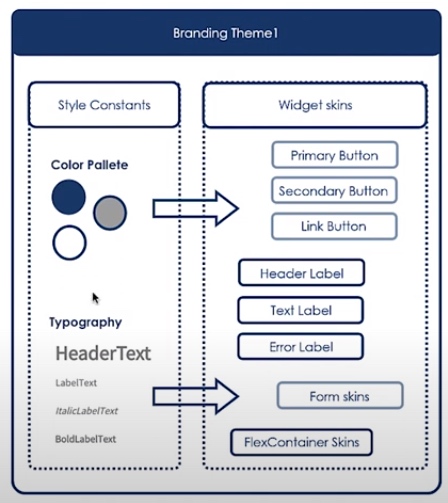
Style Constants Enhancements
-
Two-step and multi-step gradient for color constants
-
Ability to import/export style constant list across themes and projects
-
Enhanced structure with JSON notation for ease in programmatic application and storage of style constants
Accessibility Enhancements for Apps built with Volt MX
-
Widget compliance for WCAG 2.0 & 2.1
-
Video widget captioning via Tooling
-
Focus order and navigation via keyboard
-
Reflow of widgets to be compatible with screen readers that zoom-in content
-
Adding customizable tag names to enable custom accessibility behavior
-
Improved Tooling support for accessibility Config properties
-
Assign accessibility attributes using i18n keys
Responsive Web Enhancements
-
Properties that provide more control and flexibility: padding, GutterX & GutterY
-
Based out of similar properties present in CSS Grid Layout for ease in design
-
Breakpoint forking enabled accessibilityConfig property set
iOS Home Screen Widgets
A widget elevates key content from an app and displays it on the home screen of an iPhone or iPad, where users can see it immediately.
-
Home screen widgets can be of different sizes (Small, Med, Large) and have different configurations
-
Widgets can be configured to have different reload policies (never reload, load after displaying last entry, particular date-time)
-
Users can deep link into the parent app through the widgets
-
iOS Home screen widgets can be designed in Iris Canvas
App Clips
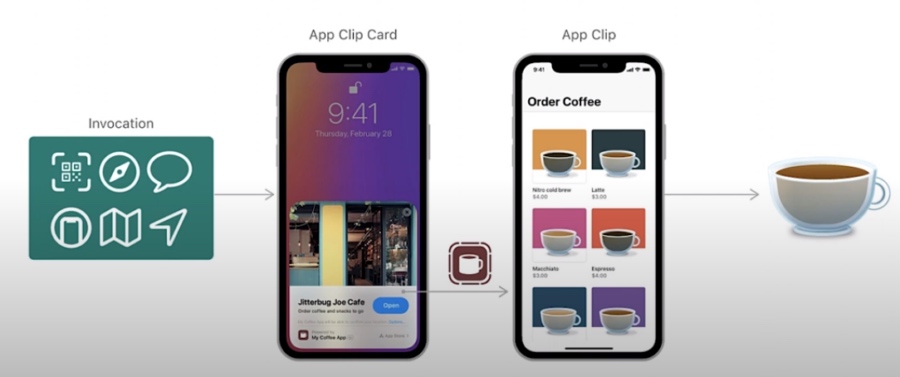
App Clip is a small part of your app that’s discoverable the moment it’s needed (like ordering food from a restaurant, paying parking fee) and lets people complete a quick task from app, without installing the full app.
-
App Clips can be launched by
-
scanning an AppClip code or QR codes
-
clicking a link in messages or browser
-
tapping NFC tags
-
placing cards in Maps
-
Can be used to finish one task
-
Can be used to promote downloading full app
-
App Clips can be designed as a separate project in Iris but combined with the parent app in XCode
-
All features of App Clips should be present in the parent app
Iris Tooling & Flare Enhancements
Iris Productivity Enhancements
-
Filter for Project Explorer Resources
-
Simplified Font Search
-
Pinning and Distribution Tools for Widget Layout
-
Color Picker Support for Swatches
-
Ability to lock Controllers and JS Modules
-
Data Panel & Action Editor support to list Custom XML mappings for a Foundry Object Service
-
Setting for the build format for Android and iOS apps
Flare Enhancements
-
Highlight the Active Widget
-
New widget-level properties and events to display focus on the active widget: activeStateSkin Property, onBlur Event, onFocus Event
-
Embed Local Videos in Web Apps
-
Play videos from the device’s local storage in Responsive Web apps
-
Local Authentication API Enhancements
-
New Local Authentication API that directs users to enroll for biometrics
-
Local Authentication API enhancement by adding the authenticators parameters
Flare Enhancements – Widgets
-
Block pop-ups in Browser widget: new property to block pop-ups from appearing in the Browser widget
-
Dynamically re-size the TextArea widget: New properties to dynamically resize the TextArea widget based on the number of lines of text entered. Users can set a maximum height post which a scroll bar appears
-
Support for String values for the autoComplete property of TextBox widget.
Hot Reload Enhancements
-
Enhanced app dev productivity by allowing very quick preview of code changes using Hot Reload support in
-
Components
-
Forms
-
Form Controllers
-
Form Controllers Extensions
-
Segment templates
-
Segment template Controllers
-
Reference Architecture (MVC) and Reference Architecture with Extensions applications
Linting Configurations Enhancements
-
Define rules for the Project or Workspace & based on Environments
-
File based rules: max-line, max-lenght
-
Function based rules: max-lines-per-function, max-params, max-nested-callbacks, max-statements
-
Custom linting: configure custom rules to extended programmatic and style guidelines
-
Rules for viewing code and throw warnings and alerts for inconsistent code structure
Foundry – Business Process Workflow
Invoking Foundry Workflow Services
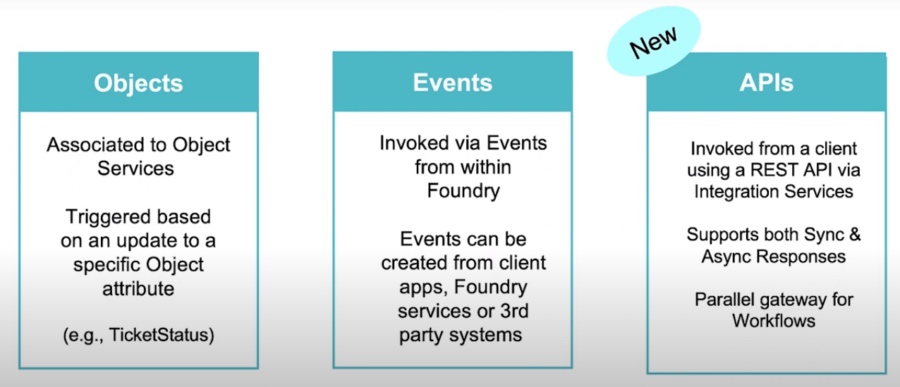
Workflow Enhancements
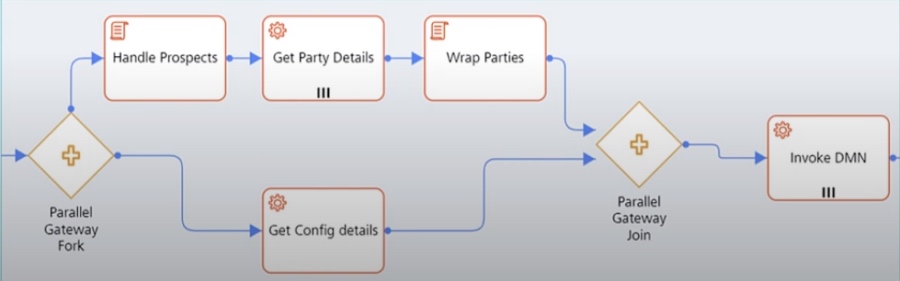
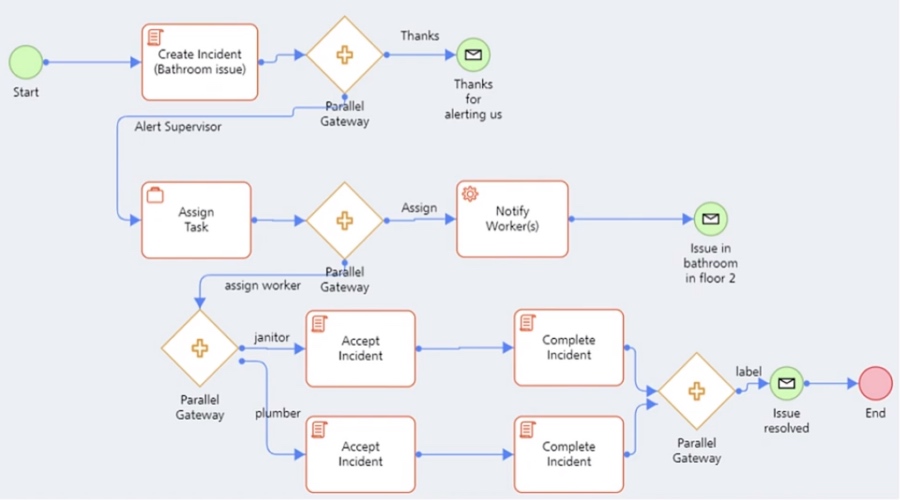
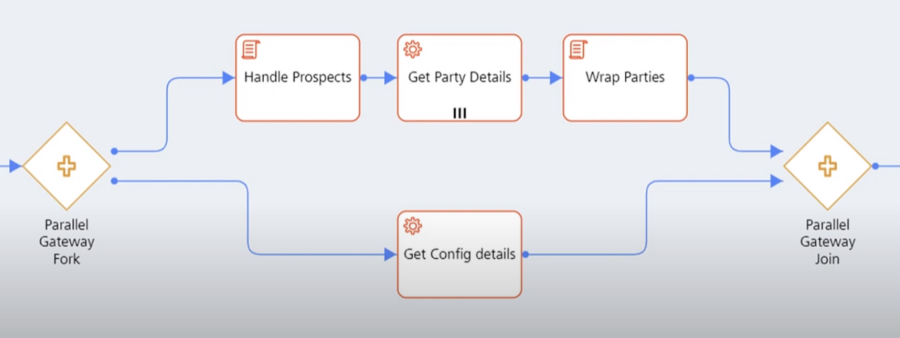
Parallel Gateway for Workflows
This feature allows multiple series of tasks to be executed in parallel as well as forking and joining workflow tasks.
As a use case you can optimize the workflow execution time and streamline independent tasks in synchronous workflows.
Looping Support in Workflows
-
Execute a task multiple times based on an input criteria
-
Loop tasks based on Counter value or an input Collection
-
Run iterative tasks from Foundry layer instead of the client device
-
Available for API triggered workflows
-
Tasks can be optimized to execute Sequentially or Parallely
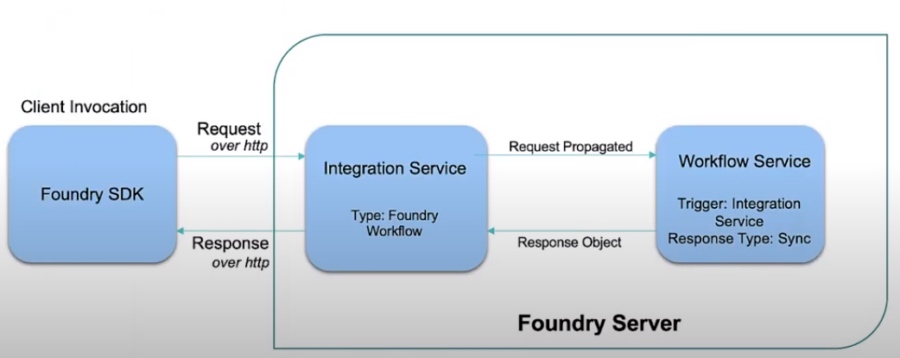
Synchronous Response from Workflow Service
-
Client API Request waits for the response from the workflow service
-
Used for straight-through processing that executes quickly
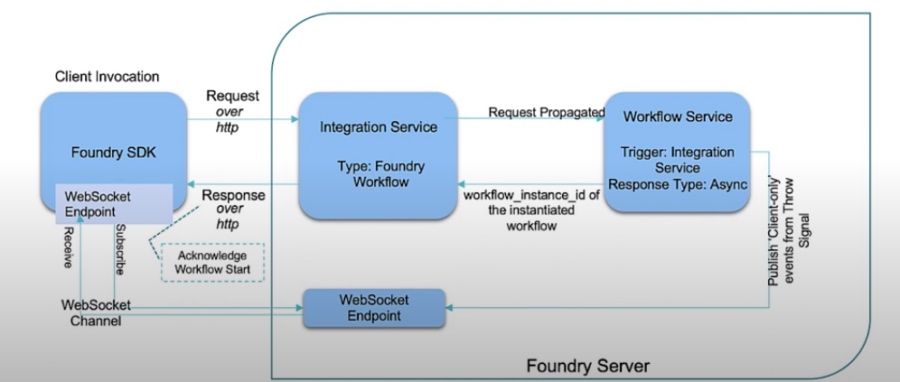
Asynchronous Response from Workflow Service
-
Client is unblocked using a WebSocket to wait for the async callback
-
Used with slower services or long running processes
Foundry – Identity / API Management / Connectors
Enhanced Red Hat PAM Connector for Business Process
-
Expanded meta data discovery for Red Hat PAM Connector
-
Support for OAuth Token Management for Red Hat
-
Additional Operations to invoke custom queries and task management APIs
API Management Enhancements
-
Introduced “Front End API” and “OpenAPI Specification”tabs for Object Services
-
Customize Front End URL and HTTP method for verbs
-
Expose REST style APIs for Object Services in the Developer Portal
-
Configure which Request and Response parameters are displayed in the Developer Portal and API Documentation
New Service Extensibility Features
-
Each layer of the Object Service supports Base and Custom config
-
Base configuration can be locked to limit changes in the base service
-
Upgrades safely applied to the base service and retains custom configuration
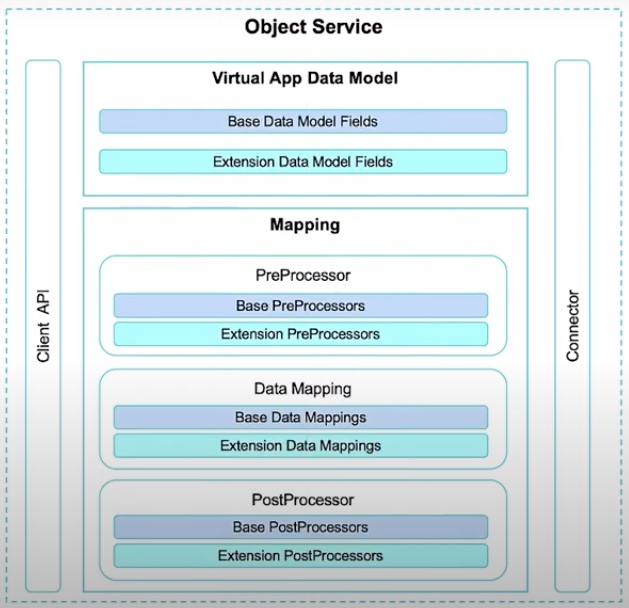
Current support for Adding Extensions
-
Integration Service Parameters
-
Object Service Pre/Post Processors
-
Object Field Attributes
-
Data Mapping for Object Verbs
-
Addition of new Operations in locked apps and services
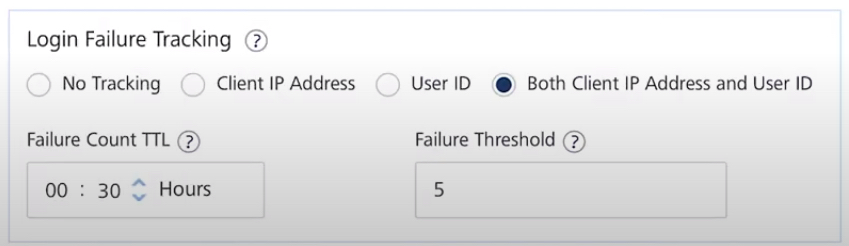
Login Failure Tracking within Identity Service
-
Automatically block malicious login attempts (Custom Identity Connector)
-
Track login failures based on Client IP and/or User ID
-
Block malicious IPs or vulnerable User IDs without affecting other user logins
OAuth Login in the same browser window
-
OAuth Identity Connector now enables web apps to display the OAuth Provider Login page in the same browser window (without opening a new tab or pop-up)
-
The Client SDK provides configurable parameters to use a second browser tab or display the login page in the current active tab.
DevOps Test Automation
Test Automation Enhancements
-
Create test suites and test plans that contain test cases from the dependent Micro Apps present in a Composite app
-
Ability to group failed Test Cases and re-run the Tests
-
Cross App Testing
-
Code Coverage with Istanbul
Grouping and Re-running Tests
-
Sometimes tests fail for various reasons during the automation process that present a false failure
-
You can group these tests together and re-run them to check if the problem is easy to reproduce as part of the automation process.
Page Object Model
-
Creates a page object model for each form/component/template
-
POM file is an editable JSON which includes the info of key-values pairs of all the widgets of the source page
-
Eases the test resources maintenance
-
Reduce code duplication
App Factory Updates
-
Cucumber test scripts support for testing Foundry APIs
-
Build and deploy client and foundry projects from App Factory command line
-
Overwrite testing data for each environment while executing test cases via App Factory
The webinar also had some interesting demos which have shown what HCL Volt MX Curie can do so check it out .
If you need any assistance in your journey with low code development just drop us a line and we are happy to help.
Filed under hcl product news, hcl volt mx