
Super.Human Installer & Genesis Directory Overview Guide

Prominic introduced Super.Human.Installer earlier this year, and at Collabsphere 2023 our own co-founder and CTO, Justin Hill, presented an in-depth demo of this great open-source tool.
Why We Created Super.Human.Installer
You might remember that in 2021 Prominic introduced a SaaS friendly SMS multi-factor authentication for Domino 9+ . The problem with the MFA was that it took 14 steps to install. So, in 2022 we came up with Genesis , a software distribution system for Domino which solved the issue.
Despite the work that HCL has done with Domino there are some problems which still persisted with Domino:
- Domino 12 has different installers for different features: Verse mail, Leap workflow, NomadWeb, Rest API, Traveler, etc.
Even with the work that HCL has been doing to include some of these in the Domino core in the future, some edge components will remain as separate installers creating issues.
The goal for Prominic has been getting the preparation of a Domino server to be easy, fast and repeatable.
Here are some of the issues we have identified and which we hope to solve:
-
The Domino apps are hard to find and install. Independent Software Vendors for Domino need to use modern best practices to publish apps. Reinvigorating the ISV market requires automated installs and several versions for QA and regression testing.
-
There is still no end user portal for Domino
-
Nomad Web changes the landscape. Finding Domino apps should be as easy as finding something in Apple’s AppStore.
-
The reality of working with Domino is that most users have too many working tiles in their Notes Workspace thus complicating a situation which should be straightforward.
The solutions to these issues should be community driven, open source and hopefully in collaboration with HCL. Ideally they will not work just on Windows but Mac and Linux as well; they should promote a solution on Mac M1/M2 (ARM). Since the goal is to help the Domino community and allow all developers to come up with ideas, any solution to the problem still visible with Domino needs to be developer friendly.
The purpose is creating repeatable best practices for Domino configuration and for ISVs drive potential customers to them.
One other thing that Prominic is hoping to achieve is promoting app discovery by businesses and end users, and showcase real solutions to problems faced by end-users, not just by IT to help administer Domino. Also, the hope is to provide a safe playground to test a variety of combinations of Domino core and developer created code.
Once the playground experiment is successful, package up an app for distribution in https://Genesis.Directory .
Why not use Containers and Docker?
The answer to that comes in the form of more questions:
-
How many developers feel comfortable with administration?
-
How many administrators create Domino servers following all best practices to which the devs should deploy code? Is Gzip enabled? Translogs? JVM Heap?
These are issues that have yet to have a solution and we must work to solve them.
One lesson that the Domino community needs to learn is: Control the User Experience! Leaving everyone to figure out Docker does not get the job done. We need a better way to get NEW grads involved in Domino which is critical to the long term survival of the ecosystem. Dev availability drives platform retention decisions by customers.
Let’s explore Super.Human.Installer.
Here we’ll go through the following steps:
-
Installing a Domino application with no keyboard interaction from the Genesis.Directory catalog (if ACL on NSF was ok)
-
Accessing a traditional Notes Client app through Nomad Web
-
Performing an ACL workaround if the application did not have the username listed that was created during the fresh server setup.
Here is the system configuration used for the next shots:
-
iMac 2019
-
MacOS Ventura 13.5.1
-
Intel x86 CPU
-
64 GB of RAM (you should have at least 12 GB of RAM)
-
3 Ghz 6-Core Intel Core i5
In our experimentation with Nomad Web we found out that Firefox is the browser that complaints the least if you have self-signed SSL keys and you are trying to access Nomad Web. So in Settings you will see that we made sure that the browser we knew would work is selected.
Now the fun stuff is having a Domino server installed without much fuss: just pick the name and the organizational certifier and that is it.
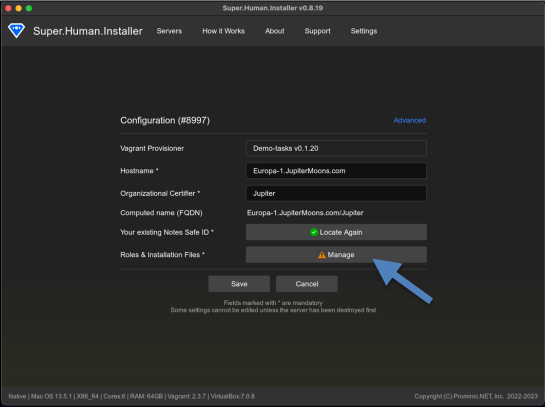
The next step was selecting the Safe ID. The reality is that most of us already have a Notes Client and we want to be able to access the server we are about to create without much trouble. The neat part about this step is that you can choose which features you want to enable by pressing the installer button to the right.
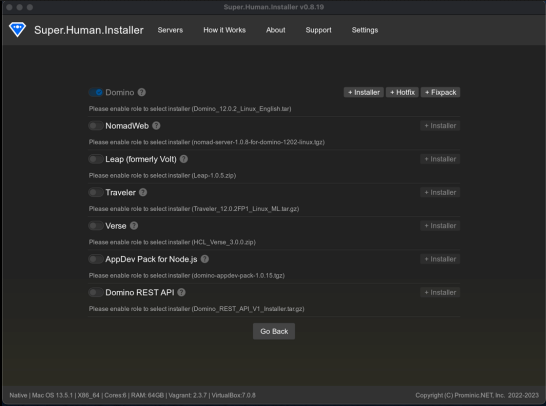
The user will need to have the install files downloaded and needs to select them, a step we hope to skip in time.
After you have selected your features you will get this screen where you can press the play button and get things going.
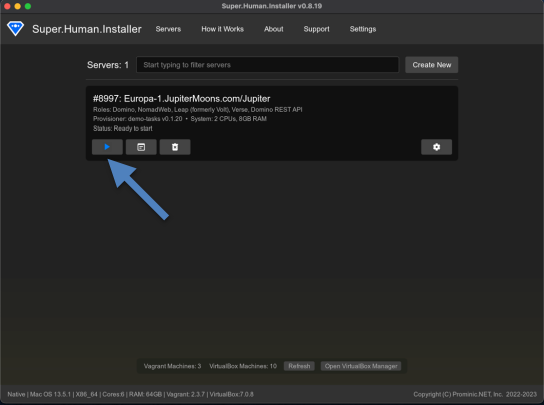
Once the whole process of installing the Domino server it’s done it will pop open that Firefox browser.
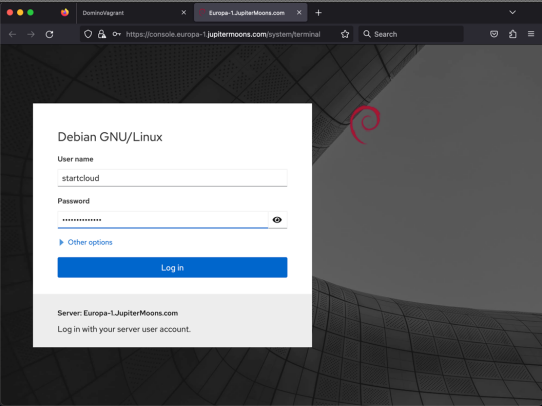
So, now we have a fresh Domino server installed, we have added an entry to the HOSTS file manually. The server includes a working SSL and you get browser access to the Domino console using Daniel’s Nash tool from nashcom.de .
The next logical step is having a UI to allow you to explore further. This UI gives you access to different add-ons as well as working as a platform where you can find information about tech you might not even know about. This is the real thing of interest here: an integrated directory of apps that Super.Human.Installer knows about. The process of installing a Domino app is as easy as can be: just choose the app and click install. After that you will get a new entry on the left side of the portal displaying that the app has been installed.
Next you will need to login to Nomad Web and you might get an error when doing that which is your ACL blocking the install of the app you just thought you installed. The solution to this problem is using your existing Notes Client / Admin which is attempted to be cross certified automatically. Just make sure you create a location document first.
One error you might encounter is about the cross certificate not working especially if you keep creating servers with the same name. You will need to delete the cross certificate from your local Notes Client. If it still happens, download the user.id file listed on the Downloads page.
Benefits of using Genesis catalog for deploying private or open-source apps
You can check out the whole process of adding a new app to Genesis.Directory in this video.
One great thing about Genesis is that you can keep your Genesis catalog behind your firewall. Or, if you have an open source app you can select for the Package and App documents to be included in the public Genesis.Directory .
As a short overview:
-
You get a much easier and repeatable way to install a Domino server including all the features of Domino V12
-
The length of time it takes for Super.Human.Installer to install Domino is as low as can be
-
You get flexibility by having repeated automatic installs on different versions of Domino with different fix packs
-
Enables easy regression testing to improve QA for releases.
The purpose is to:
-
Use a DevOps approach
-
HCL opened the possibility with Domino V12 with the One Touch Setup JSON format
-
Genesis extended the JSON format
-
Each Genesis app has a JSON format example
-
There is now a Genesis JSON format reference guide.
Here is what is happening behind the scenes: Provisioner scripts are using a hyper visor (VirtualBox) and a DevOps system (Vagrant and Ansible local runners to the VM) to create a fresh Linux OS VM, install Domino using One Touch Setup, adding all selected features to it, and using Genesis to install the Portal. It’s all extremely customizable for all ranges of people.
So, what are the needs for Domino?
-
ARM processor support;
-
The HyperScalers, including AWS increasingly are pushing ARM based virtual machines for massive core density.
-
Predictions are that in 3-5 years x86 VM premium will be huge.
Super.Human.Installer recap:
-
You control and run your system wherever you like, including developing a test laptop running Mac, Linux, or Windows even though the server OS is Linux.
-
If you decide to host with Prominic or another MSP, you can supply the Provisioner scripts to exactly generate your settings and install your apps.
-
You stay in full control of your data and critical systems.
-
Use TerraForm to deploy to multiple clouds.
What is planned with Moonshine.IDE?
-
It’s the first non-IBM/Lotus/HCL to support Domino natively in any way
-
It’s lightweight and fast
-
Focused on getting devs started including installing needed tooling
-
Provides a fresh start for Java on Domino
-
Simple Domino Form builder to quickly jumpstart database design
Make sure to also watch Justin’s presentation since it’s filled with interesting insights.
For any questions on the Super.Human.Installer or Moonshine IDE we are just an email away.
Filed under cloud, hcl domino