
Enable MFA for HCL Domino 9 with Protectimus

During Collabsphere 2021 Prominic.NET presented a new option for multi-factor authentication for HCL Domino.
The new tool is called MFA for HCL Domino®. It is free and open source, licensed under the Apache license and it provides both SMS and TOTP support, a fully customizable user interface, and multi-language prompts
Here is a sneak peak on how the login page will look like when you have the MFA tool enabled:
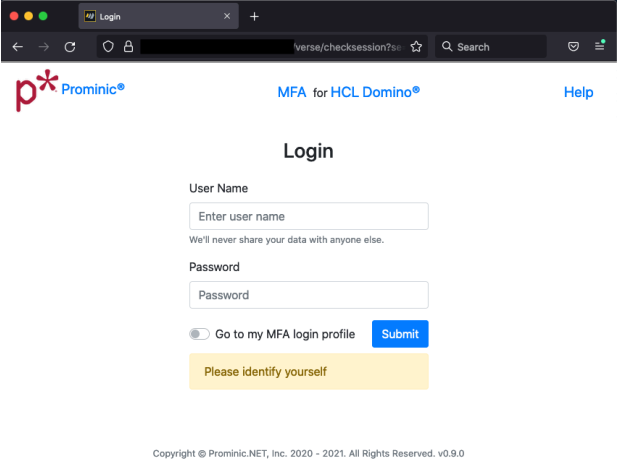
The user can choose to go to the MFA login profile or to proceed with the login.
This is what the Multi-factor authentication page looks like:
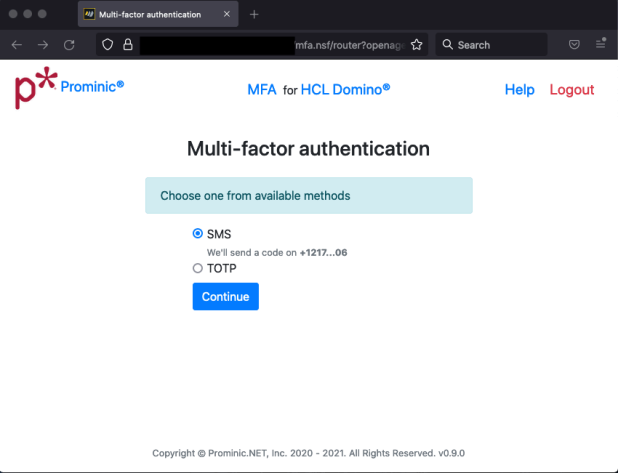
Here is where you decide which authentication method you would like to use. Should you go with the SMS version the app will send you a code via a text message. The phone number is present there partially for a quick check. This aspect is configurable. You also have the option of signing in with a time based one time password token.
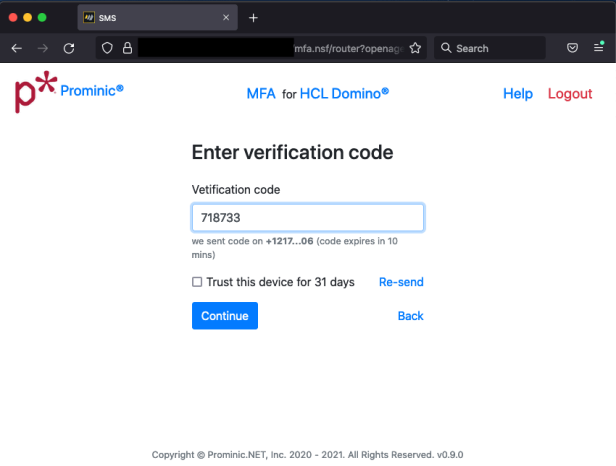
The text message that is sent is customizable as well. After entering the code, you are good to go. You also have the option of selecting to trust the device.
Here is how the MFA Profile page looks once you have logged in:
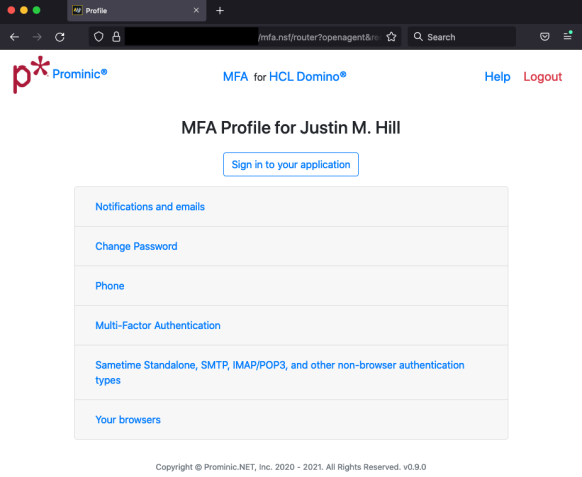
This is where you can customize your experience, be it changing the email or the notification status, password or phone.
The Multi-Factor Authentication page will be visited if you want to use the TOTP.
What is MFA?
-
Knowing a username and password is no longer enough. You must now have another “factor” to login.
-
Common banking sites allow for SMS. Technically SMS can be breached via SIM cloning and is not ideal. High profile SMS targets include Twitter’s CEO.
-
Time based One Time Passwords (TOTP) are superior. More cumbersome to manually enter TOTP though!
-
Trade off between convenience and security.
What does TOTP look like?
-
Step 1: User opens the app
-
Step 2: User enters the code at the login prompt along with the password.
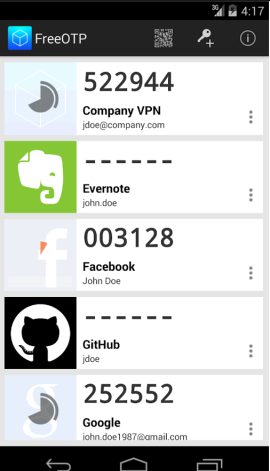
Hardware TOTP for keychain
-
Thumb drive size devices
-
Can be used with any TOTP tool that complies with the algorithm standard
-
Some providers include:
Commercial MFA solutions
Commercial solutions in the market may be a better fit for your use case.
Be sure to check them out:
-
CyOne: https://cyone.eu/products-and-solutions/two-factor-authentication/
-
PortalGuard: https://www.bio-key.com/multi-factor-authentication/
The presentation Prominic held did not focus on TOTP and we invite you to do your research should this be a solution for your Domino app. HCL Domino 12 TOTP option is more technically sound because it is the built-in solution.
There are some MFA solutions you might want to check out:
-
CyOne: https://cyone.eu/products-and-solutions/two-factor-authentication/
-
PortalGuard: https://www.bio-key.com/multi-factor-authentication/
One of the things that the emergence and great popularity of cryptocurrency has brought is a rise in ransomware attacks.If you are wondering why, well, for one it’s nearly impossible to track where the money goes, the Interpol proves to be helpless and some countries would not even bother if the targets are outside of their borders.
That being said, there is also an increase in MFA requirements. Many insurance carriers are now requiring Multi-factor Authentication and predictions are that within a year all corporations will be required to have it for e-mail at least.
Why was MFA for Domino created?
-
Provides a free and open source solution for Domino servers on 9, 10, 11,12+
-
Hacker activity massively increasing
-
Needed customizable user enrollment experience
-
Enrollment can be phased in to your users
-
Unlike Domino 12 TOTP, MFA for Domino must modify the Person doc HTTP Password as part of enrollment.
MFA for HCL Domino Features
-
Compatible with Domino 9.01 FP9 and higher
-
SMS support with auto-population on Safari
-
‘Remember Device’ functionality
-
Sign-in alerts via e-mail
-
Report your geolocated IP address on sign-in is a feature we are still working on but it’s on the short list.
-
Does NOT require the user to install a TOTP app (such as Google or Microsoft’s Authenticator, Authy, etc).
-
Customize the logo and the text shown to the user at each step
-
Multiple language support
-
Ideal for Software as a Service solutions built upon Domino
-
Fully customizable login experience – access the source.
As proud as we are of this solution there are some cons to be taken into consideration:
-
Drawbacks to the system: it needs to be deployed to all servers running HTTP Stack
-
It modifies the names.nsf Person document HTTP passwords for MFA-enrolled users (does not impact Traveler users)
One other thing that needs to be taken into consideration is that our solution is only for browser based login protection.
No solution adds MFA support yet to non-HTTP protocols including:
-
SMTP
-
IMAP
-
POP3
-
LDAP
-
Sametime
-
Others
How does it work?
-
The system uses password obfuscation at its core
-
Upon enrollment, user enters their current password or selects a new password (the admin can also force a new one)
-
MFA for Domino sets the Person doc password to:
- Second factor (SMS or TOTP) now required during login for the user to authenticate.
mfa.nsf does not store user’s passwords – only the secret
Components of MFA for Domino
-
iMessageSMS Java Add-in Task (appears in “show tasks”)
-
Twilio.com account for SMS gateway
-
Prototype of SendBlue.co (not .com!) account for iMessage
-
mfa.nsf on each HTTP server
-
domcfg.nsf for custom login form
-
Traveler – DSAPI filter to bypass MFA on it.
Deployment and Config
-
Deploy at least one server with iMessageSMS.nsf and corresponding Java Add-In task
-
Enroll for a Twilio account
-
Deploy mfa.nsf on a Domino server with HTTP Stack.
-
Sign mfa.nsf with your admin-level ID
-
Press the Update Login Form button in mfa.nsf Template view
-
Replicate mfa.nsf to other HTTP Domino servers
-
Setup connection documents for mfa.nsf
-
Modify domcfg.nsf to point to custom login form inside mfa.nsf
-
Ensure Single Sign On is configured
-
Deploy DSAPI filter to Traveler servers.
SMS gateway is based upon Java Add-in Task
-
Agents are too slow in this case this is why an Java Add-in Task has been used – need <1sec processing
-
It’s not based upon OSGI or UpdateSite dependencies
-
Shows up as a simple Domino task using “show tasks”
-
If you have multiple servers, you don’t have to deploy iMessageSMS Java Add-In to all of them. Instead, you can use 1-2 servers as the Twilio SMS gateways.
Twilio has proven to be a great and stable tool so using their services should not come as a risk as it is a Single Point of Failure. You will also need to bear in mind that your logins are now dependent upon Twilio for users that did not use the “remember device” option.
Enrollment rules setup
-
Users can be soft-enrolled to delay requirements of SMS
-
The Admin can set the number of days before enforcing MFA
-
You can select the amount of phone number to display upon SMS
-
Choose how long the SMS code is valid
-
Easily change the logo, header, help file, company name
-
Internationalization is easy.
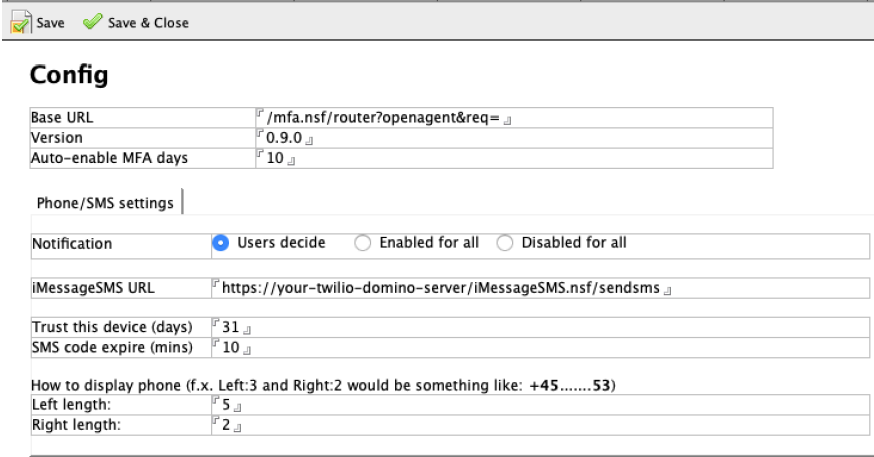
This is the core config document for MFA
Sametime
-
Workarounds for Sametime embedded in Notes Client
-
Sametime Proxy works
-
Sametime iOS and Android mobile applications work
-
Verse works
-
iNotes works
-
Your custom Domino app will work
-
Sametime embedded in Notes Client
-
Sametime standalone
-
You must have a valid LTPAToken SSO on your Sametime servers.
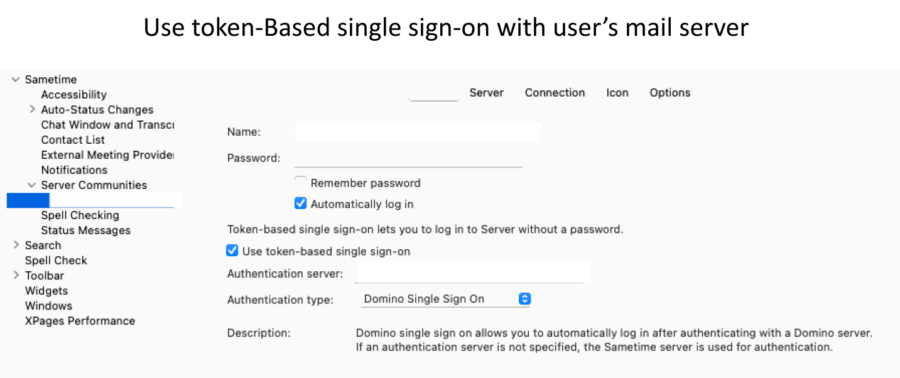
There are two considerations when setting up SSO with Sametime:
-
Whether Internet site docs are in use
-
If the LTPAToken is called anything EXCEPT the very default name of “LTPAToken ”
-
If both of the above are true, then you will have two sametime.ini settings to deploy as follows:
-
[AuthToken]
STAuthenticationMethod=0
ST_ORG_NAME=YourCompanyOrgName
ST_TOKEN_TYPE=Your Company Name For The LtpaToken
-
Set the ST_ORG_NAME to match the organization specified in the Internet site document in use by the Sametime server
-
Set the ST_TOKEN_TYPE to match the name of the LtpaToken that is in use
-
These are standard steps that are part of any successful Sametime SSO deployment
-
Nothing about the above is particular to MFA for Domino as compared to any other Sametime SSO setup
-
Restart Sametime after these changes.
Traveler
-
Because the Person document HTTP password is modified, Traveler serves need a DSAPI filter
-
DSAPI filter basically bypasses the need for a secret code
-
No less secure than current Traveler users
-
Recommendation to improve Traveler security is to use a VPN for Traveler
-
We may introduce additional security for Traveler users without a VPN in a future release using GB-Auth + DSAPI.
As great as this tool is, we could use your help as well with:
-
Providing translations from English baseline. As simple as creating another document in mfa.nsf
-
Review the solution to ensure we have properly hardened it
-
Find things we might have missed
-
Add or refine features you would find useful.
Here is where you can find the code so you can fully review the solution:
The session has been recorded and you can watch it if you would like some more insights.
If you have any bug reports, please direct them to the GitHub repositories we listed above. For any additional assistance, shoot us an email and we will try to provide you the support needed.
Filed under compliance, hcl domino