
HCL Nomad Deep Dive: Modernize Notes Deployment

Tim Clark’s Deep Dive into Nomad presentation at Collabsphere 2023 was one of the most interesting ones, and we’re excited to do an overview of this look into Nomad.
If you are still not familiar with Nomad , let’s explore what makes it so great: Nomad is a Notes basic client that runs in your web browser or a mobile device without you having to install it.
It basically enables you to run Domino Applications on:
-
Chrome
-
Edge
-
Firefox
-
Android
-
iOS
What applications run on Nomad?
-
Comparable to HCL Client for Application Access (HCAA)
-
Support of @Formulas & LotusScript
-
Local Replicas enable working offline
-
Field-level security & encryption
-
No specific design modifications are required but you might still want to review your apps
It does not support however: Java, OLE and XPages on Notes Client “XPiNC“
Why use HCL Nomad for web browsers?
-
Nomad offers a lightweight Domino Application experience in your browser
-
It’s easy to install and manage
-
It requires no plugins and no installation managers
-
It automatically takes updates with minimal end-user action
-
It offers you a true Domino Application experience that is OS platform agnostic
-
The local replication and offline use allow for true application mobility without the need for an active network connection
-
You can easily switch between user profiles
-
It’s easy to migrate from Notes using Panagenda’s Marvel Client
Why HCL Nomad for mobile?
-
You can use Domino applications on the go
-
Convenience of your Domino Apps running on your mobile devices (iOS, Android)
-
Local replication and offline use allow for true application mobility the need of an active network connection
-
Expand your Domino Application use with device integrations:
-
GPS with LotusScript class NotesGPS (also available with HCL Nomad for web browsers)
-
Camera with File Import / File Attach
-
Barcode / QR Code scanning capabilities
-
Easily embed a hand-drawn note or picture into your rich text fields.
How do I install HCL Nomad?
The installation process was designed to be as lightweight as possible:
-
Go to a URL in your favorite browser
-
Log in with your credentials
-
Enter your Notes ID password (Not required if Federated Login is configured)
-
And you are Done! You now have access to your Domino Apps.
When it comes to iOS and Android, just install from the App Store or Play Store and configure!
Update Process
As you might expect, the update process is just as easy.
-
Available updates are taken automatically on client start
-
If an update becomes available during a session, then the user is prompted to update.
-
Just click “Update” and HCL Nomad will relaunch the updated version
-
Mobile clients automatically update from the iOS App Store and the Android Play Store.
Nomad Federated Login (NFL)
-
During setup NFL users a SAML assertion to download the Notes ID from the vault so the user doesn’t need to ever enter their Notes ID password
-
During the initial client configuration users log in through their Identity Provider (idP) a single time
-
Users only maintain a single IdP credential
-
Note: Nomad Federated Login requires SAML IdP authentication but is separate from SAML IdP authentication
-
SAML authentication can be configured for just Nomad Server authentication
This feature is currently available only for the web browser version but the plan is to have it available on iOS and Android soon.
HCL Nomad Mobile Management
Deployment Settings
-
Domino server
-
Domino server hostname
-
Username
-
Lock Account Settings
Advanced Settings
-
Connection Documents
-
Passthru Documents
-
Notes.ini
Restrictions
-
Mail
-
Replication
-
Cut, Copy, Paste
-
Import
Nomad Server on Domino
-
Make HCL SafeLinx optional
-
For customers with existing reverse proxy or load balancing (RP/LB) infrastructures
-
For the smaller customers with limited resources
-
HCL SafeLinx is still an option with many benefits at the proxy level
-
Addin task on Domino
-
LDAP server is not required
-
Nomad Server uses Domino for user and server lookups
-
Integration with CertMgr to TLS configuration
-
Automatically picks up changes/renewals without restart
This architecture has been transformed from this:
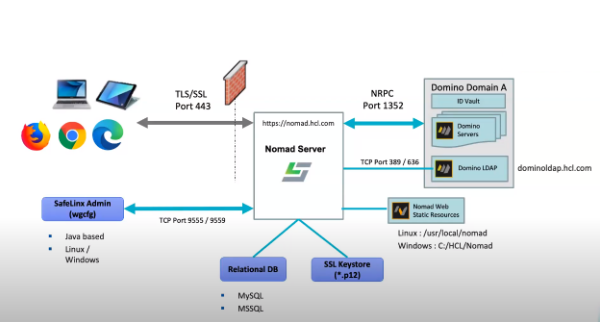
to this:
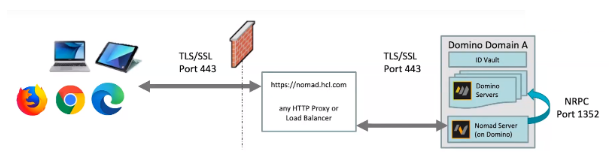
Design Updates for HCL Nomad
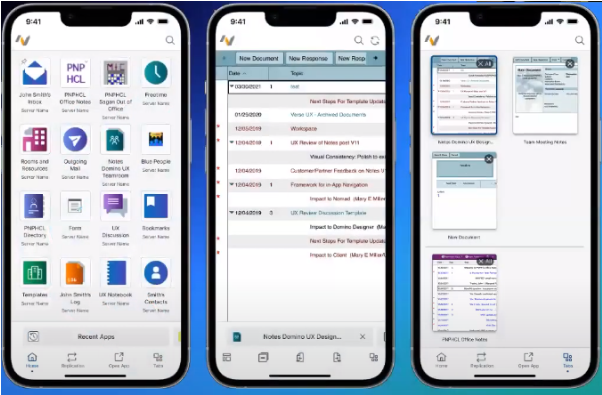
Mobile Redesign
HCL Nomad has been optimized for Mobile. You can now interact with Nomad like other mobile apps you’re already familiar with. It’s now faster and easier to move between tabs and applications and also it has a modern look and feel.
One other really great design improvement is the New workspace layout which combines recent apps and workspace for greater customization. You can now pin apps to the top or hide from recent apps. Also, you get the search app library to quickly find what you need.
Find, Find and Replace
Find: With a document open in Read mode, tap the Search icon to Find user-provided text within the document.
Find/Replace: With a document open in Edit Mode, tap the Search icon to Find/Replace user-provided text within the document.
QuickFind
Long-press on a sortable column label to open QuickFind for that column.
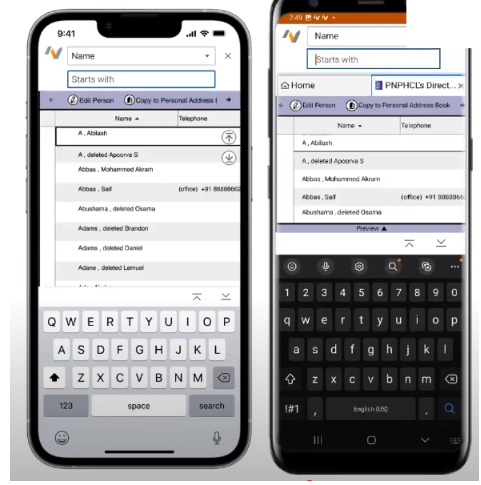
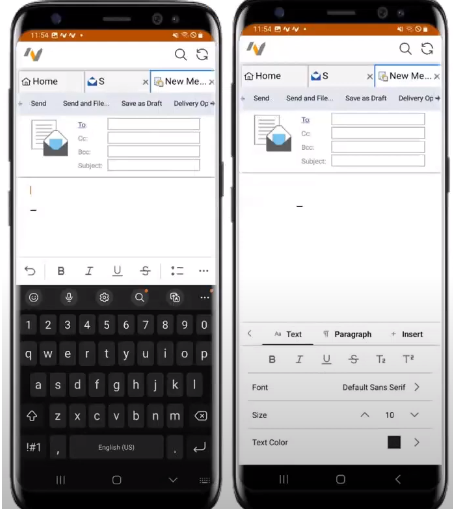
Dynamic Text Edit Toolbar
The text edit shortcut menu moves with the keyboard; the overflow menu with full editing capabilities.
Toolbar Changes
So far these features have been implemented: Toggle between expanded & collapsed, Next/Previous unread. These are the features that are planned to be implemented soon: Frameset navigator and App tag navigation.
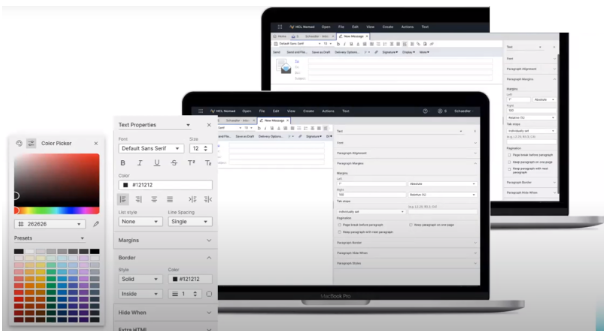
Nomad Web: Infoboxes become the Properties Panel
-
Right-click to open
-
Resizable
-
Design upgrades in progress
The recording of this presentation is here if you would like to see the nice demos that Tim had.
If you need any help with HCL Nomad, reach out to us and we will do our best to help you with all your troubles.
Filed under hcl nomad