
Essential How-Tos for IBM Domino Apps on iPad

Running Domino apps on iPad natively is now officially possible. It’s been one of the most anticipated new features to be released for Domino 10. Last week’s webina r from IBM showcased running different legacy Domino apps on iPad, as well as going over some of the specifics and limitations.
Running Domino Mobile Apps on iPad
Your Domino Mobile Apps (DMAs) will work even if they were written years ago. When you deploy IBM Mobile Apps those apps will become mobile by default.
This apps will not work only on iPad, but they will become offline apps as well.
Basically, you can make your old apps mobile with little effort, they will behave the same way they did up until now, it will just run on iPad.
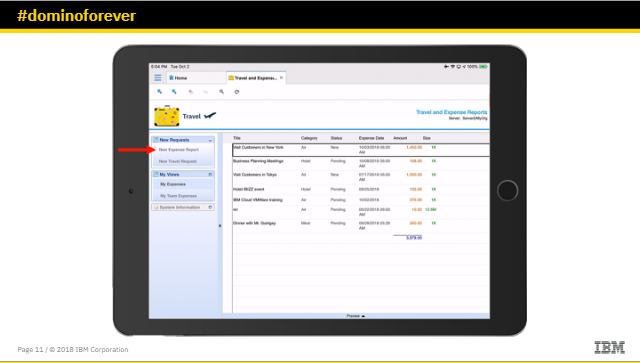
The public beta of Domino V10 mobile apps became available a month ago. Once you registered, you could access Apple and start Domino apps client and check out how it works on iPad.
Licensing Clarified
One of the first things that was addressed in the webinar was the licensing. IBM made things easy, and left it pretty much similar to IBM Client for Application Access. It will be included in the Enterprise Client Access License and it comes free of charge for customers that are currently under active subscription and support contracts.
UX Design updates
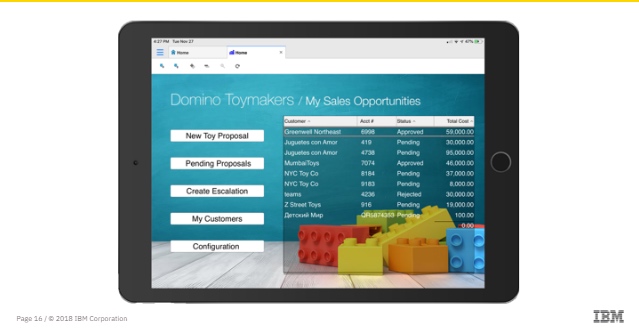
This is an example of a Domino app, a CRM based on the Domino platform. To run this on iPad, some minimal customization was needed for an improved iPad user experience. A new landing page was created, instead of migrating or rewriting the app, they made a new landing page so it’s easy to view and access.
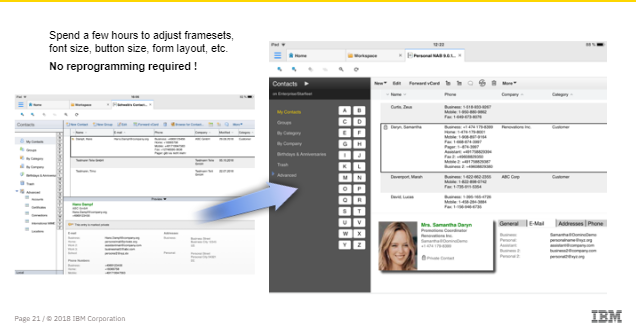
You need to keep in mind the difference in UX design between desktop and iPad applications. Your existing Notes apps are optimized for traditional Notes Desktops. An iPad has a different resolution, on-screen keyboard, native iOS controls, and no pinpoint navigation without external devices. This means some minor tweaks might be needed like:
-
Enlarging font sizes, buttons or icons
-
Widening the space between view / folder names in outline controls
-
Adjusting form layout, enlarge fields and widen space between UI controls
-
Setting text fields to display as native iOS text input controls.
The great thing is that all of these changes combined would not take as much time as it would for you to re-write the app.
Getting your Notes ID file onto the iPad
-
OTA transfer from Domino server (ID vault) during the initial client setup
-
Workaroud: Manually copy the ID file into DMA app local filesystem via iTunes before initial setup
-
You don’t have an easy way to switch between ID files later; you would need to DMA app and start again “Recent Applications” is the main UI (for the time being)
-
Seft-maintaining list of recently used Notes Applications Workspace is also available but not supported:
-
GoTo Workspace via @command or notes: ///ClientBookmark?OpenWorkspace
-
Move icons to another position on Workspace by removing them first and then adding them again
What’s different in Domino Mobile Apps vs Desktop
-
You will have no application menu. You can workaround this by using @functions or LotusScript to change or get access to certain dialogs
-
“Remove” on the replicator page actually means “delete local replica”: this is different from “Remove from Workspace”
-
File attachements:
-
You can view existing file attachements
-
You can open existing file attachements in other iOS apps from the file viewer
-
You cannot store files from other iOS apps into a Notes document
-
Support for Roaming User or Desktop Policies: currently not documented, recommended to test in the Beta.
Some things will not work in DMA
-
Notes agents written in Java: There is no Java for iOS, so what you can do is move the Java code to the Domino server or code the agent in LotusScript
-
The code that interacts with the filesystems like import / export, generate report files in disk will also not work. You can make this work by moving the code to the Domino server or try to use NotesStream class.
-
Code that calls Win32 OS libraries or other Windows programs, like OLE automation. You’ll need to keep in mind that Notes Client apps integrating with MS Office on Windows will not automatically provide an integration between Domino Mobile Apps and MS Office iOS apps.
What can you do to make things run smoother? Here are some tips:
-
Present text fields as native iOS text controls. Well known iOS magnifier allows for precise cursor positioning and Copy & Paste. To do that, set the text fields to Native OS style and place the text field into the layout region.
-
Prevent in screen keyboard from blocking the bottom of the content in edit mode. To solve this you will need to create a subform with an empty layout region with invisible borders. Set the size of the layout region to match the size of the on screen keyboard. You can also set to display the subform at the bottom of the main form, to show content only when running on iOS in edit mode. This will help you scroll to the bottom of the main form in edit mode.
-
Integrate with other iOS apps: use @URLOpen to integrate with other apps. Create a new mail in iOS mail app with predefined recipient, subject and body fields. Call Google Maps app for routing instructions; open other Messaging app with selected contact.
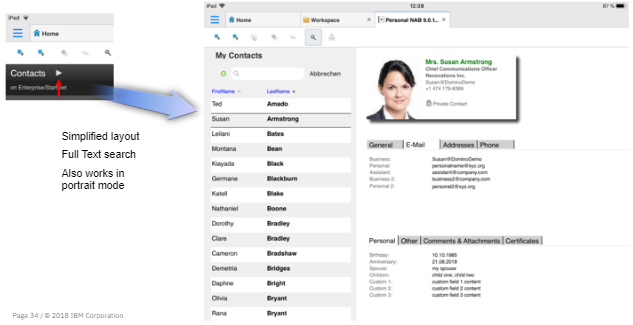
Developing new DMA for ipad: no new skills required
You can develop new Applications rapidly and cost efficiently (RAD) using familiar tools and your existing know-how
-
Domino Designer
-
Forms, Views, Pages, Documents, Framesets, Action Bars, Navigators
-
Macro language (@commands, @functions)
-
LotusScript
-
Rolling out a new Application is as simple as sending a doclink
-
There is no need to buy a Mac or learn a new programming language
-
There is no need to buy an Apple Developer account and push your Apps through the Apple App Store.
So, we hope we made you curious to check out what the new Domino Mobile Apps and take it for a test drive. Your apps can now go mobile faster and easier than ever before.
Filed under hcl domino