
Domino v14: A Deep Dive into Its Enhanced Security Features

HCL has progressed with its deep-dive series on Domino V14 with a great overview of security. Let’s explore why security is such an important piece of the Domino puzzle.
Here are some of the things that you must have by now in terms of security:
-
Running 12.0.2 FP2 (soon FP3) or 14.0
-
NRPC Port Encryption
-
HTTPS/TLS everywhere; using CertManager
-
You need to be on a supported OS version
-
Have Transaction Logging
-
DAOS (Tier 1)
-
Symmetrical Clusters
-
DKIM & SPF enabled
-
IDVault
-
IDFile encryption strength:256bit AES and SHA-512
-
Key Strenght: 2048 Bits
-
No more HTTP Password – PW checking against IDVault
-
Modern Authentication SAML or OAuth / OIDC.
HCL Domino V14 comes with some more security benefits, making a good product better. You might have noticed when talking to people in IT that security does not mean the same thing for everyone. Here are some aspects included when talking about security:
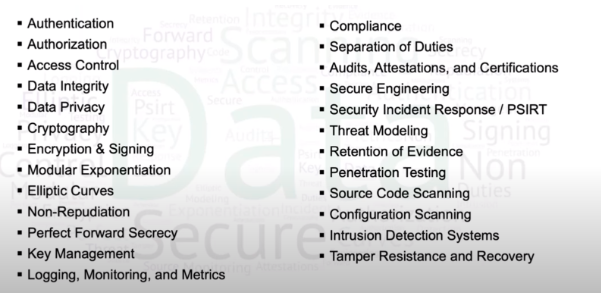
When talking about authentication you must make sure that it is simple and secure and yet sometimes we get experiences that are not that easy:

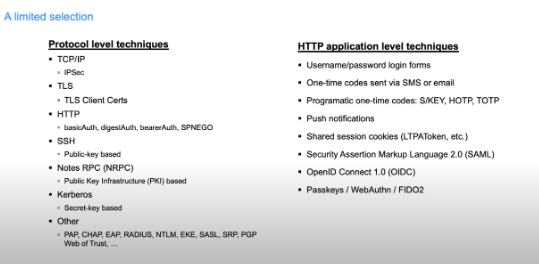
Domino V14: Authentication Approaches
There are several approaches to the authentication process, these being just a small number of them:
Many of these rely on passwords, and it’s best not to have to use passwords since they need to be remembered by the user’s number one.
Secondly, they need to be strong, unique, changed regularly, and never reused. That often is not the case as experience has taught us all.
Last but not least, passwords are the weakest link due to phishing, shoulder surfing, keylogging, etc.
Fortunately, there is a solution to this problem. The first step to take is to authenticate to a central identity provider, not the back-end server.
The old classic standard here is Security Assertion Markup Language 2.0 (SAML). It’s web browser-centric, heavy-weight, and supported by Domino for federated identity since version 9.0.
Another option is OpenID Connect 1.0 (OIDC). This is the new standard built on top of the OAuth 2.0 framework. It connects well with bearer Auth, it’s mobile/native / SPA friendly and lighter weight than SAML.
Some problems that arise with both are: the configuration is usually hard, interoperability is iffy, they are not a universal solution, and cannot federate everything.
Challenges with Federated Identity
-
Every implementation supports a different subset of the standard
-
Every implementation is configured differently
-
Configuring multiple products against identity providers can be a nightmare
Passkeys
Passkeys are considered to be a solution to the whole password management issue:
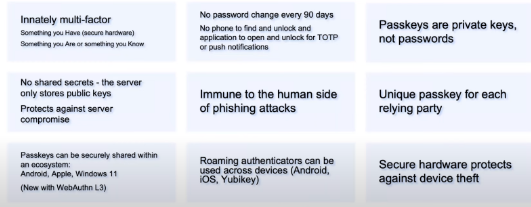
You can check out a demo of how passkeys work with Domino v14 in the recording of the webinar.
Passkeys – Setup
Requirements
-
Fully qualified DNS hostname
-
Internet site properly configured
-
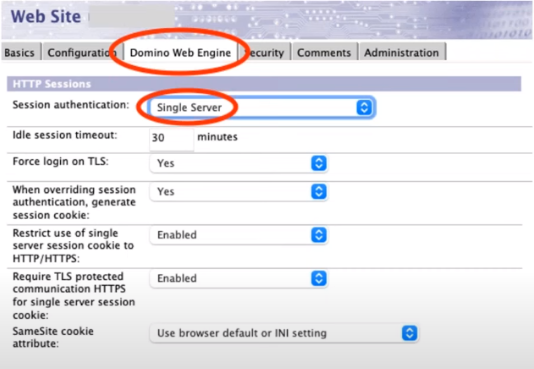
Session Authentication
-
set to either “Single server” or “Multi-Server SSO (LtpaToken)”
Supported Platforms:
-
Current web browsers
-
MacOS 11 (and Safari 16.1) or above
-
Windows 10/11
-
Windows Hello support to logging on
-
Windows 11 has enhanced support
-
Domino on 64-bit Linux or 64-bit Windows
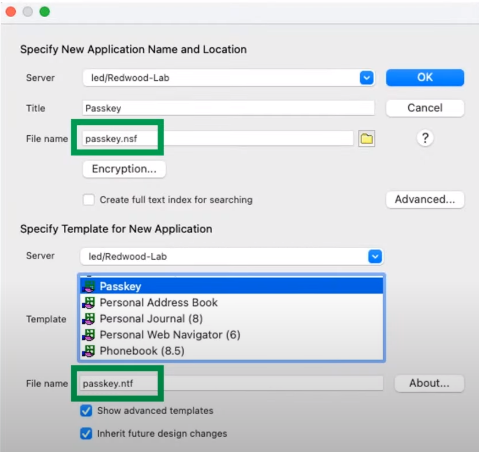
Create Passkey database
-
Filename: passkey.nsf (must be lowercase!)
-
From Template:passkey.ntf
-
Encrypt database: unless you are using the cluster symmetry feature
Replication:
- Replicate the passkey database to all the servers that are hosting the internet site
Optional: Customize the Domino Server Relying Party Name
For example your site is: https://www.domino.example.com:8443
Default configuration allows to authenticate at: www.domino.example.com

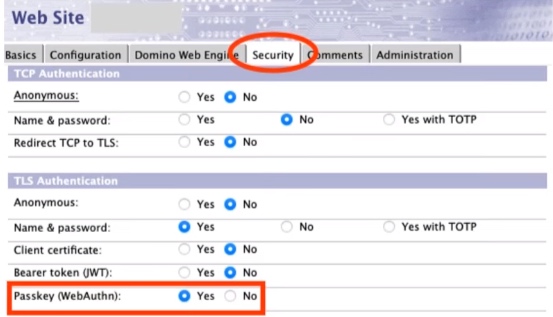
Enable Passkey support for the internet site
-
Internet Sites
-
Security: Passkey (WebAuthn): Yes
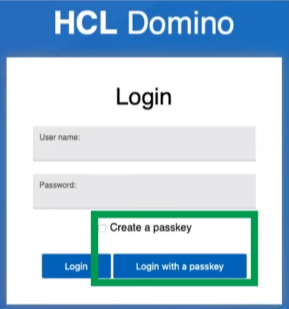
New Login Form
-
In domcfg.nsf
-
With new options for passkey authentication
Your content goes here. Edit or remove this text inline or in the module Content settings. You can also style every aspect of this content in the module Design settings and even apply custom CSS to this text in the module Advanced settings.
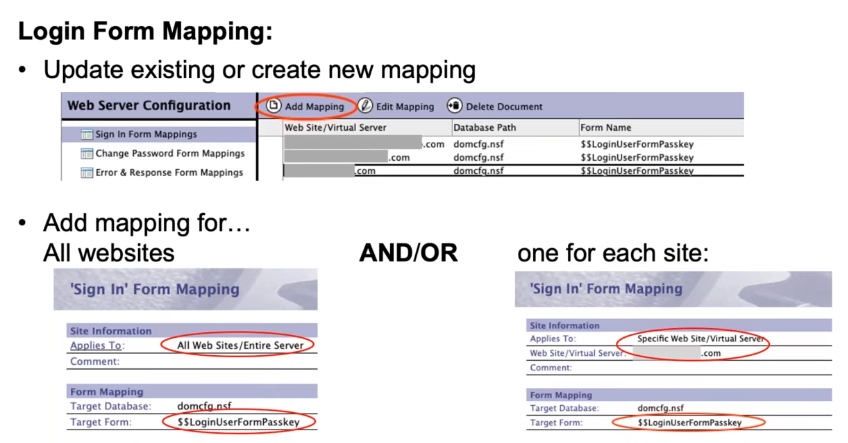
Domcfg.nsf – Domino Web Server Configuration
- Check if domcfg.nsf is using the latest template. It has to be: Template Version 14.0.0 or greater. Otherwise, replace the database design from the template
Login Form Mapping:
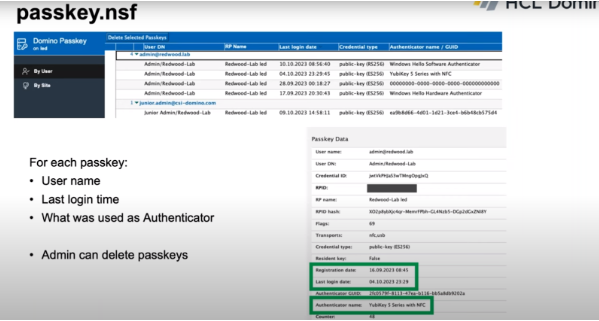
Those are about all the steps you need to take to have the passkeys set up. After that, everything should run smoothly:
OIDC – Improvements
Overall
-
Most notes.ini’s from 12.0.2 moved to idpcat.nsf
-
Caching of providers and trusted keys moved into the core server, updating every minute, and available to all tasks.
-
Stats significantly improved and consolidated under Security.OIDC.
-
Enhanced support for non-compliant providers (Azure AD or ADFS 2019)
HTTP bearerAuth
-
Now only requires “issuer” and “jwks_uri” claims in openid-configuration endpoint
-
New C API SECVerifyAccessToken – to validate access tokens against Domino’s configured providers and keys (uses DEBUG_OIDC_CACHE notes.ini)
-
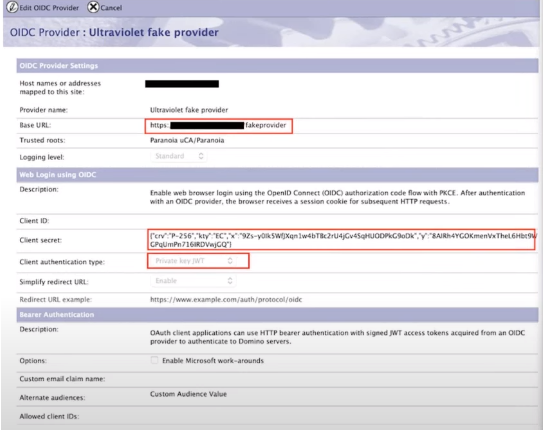
“Fake Provider” configuration
Web login with OIDC
-
Recommended: use/auth/protocol/oidc instead of /names.nsf?OIDCLogin for their redirect URI. This is required to support some providers that don’t allow “?” or “&” in redirect URIs
-
More authentication techniques: client_secret_basic + new in 14.0 client_secret_post and private_key_jwt.
-
When private_key_jwt is configured, Domino will publish the public key in jwks_uri format via /auth/protocol/oidc/keys
-
Remaining notes.ini’s OIDC_LOGIN_CLOCK_SKEW_SEC, OIDC_LOGIN_COOKIE_DURATION_SEC.
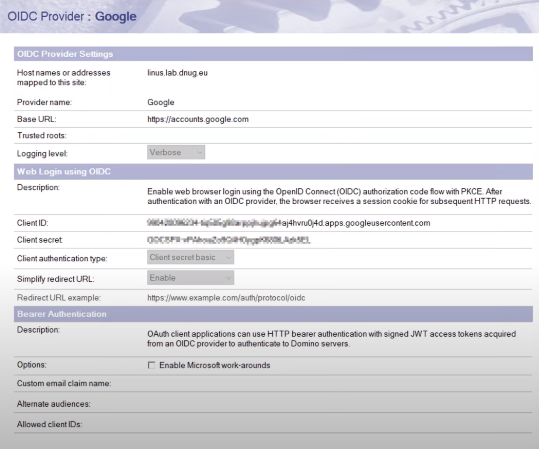
Improved OIDC UI
-
All relevant configuration was added to the OIDC configuration form in idpcat.nsf
-
Example configuration for OIDC with Google
OIDC Enhancements
Configuring Domino as a fake ODIC provider
-
Prior to Domino 12.0.2, Domino required to use of real OIDC Providers, and customers using their bearerAuth functionality asked for additional options
-
Domino HTTP server can be configured as a “fake OIDC Provider” to serve the trusted JWT signing key to itself.
Step 1: Create a file in the Domino HTTP server $DATA\domino\html\fakeprovider.well-known\openid-configuration
{
“issuer”:”Fake OIDC Provider”, <- Issuer name in JWTs
“jwks_uri”: http://yourcompany.com/auth/protocol/oidc/keys
}
Step 2: Configure trust for that fake provider in idpcat.nsf
Step 3 : Ensure the Internet Site allows anonymous over TLS
OIDC Troubleshooting
Domino V 14 Cluster safe Single Server Session Cookie
-
Usually, the better way is to use a LTPA SSO cookie
-
If a single server cookie is needed this new feature can be helpful
-
Cluster-safe, sprayable, single-server session cookies (DomAuthSessId)
-
New notes.ini DominoSessionCookieUniqueNames=1
-
Names of the DominoAuthSessID cookie becomes DomAuthSessIdABCDEFGHIJK
-
ABCDEFGHIJK is the first 11 characters of Base64url [SHA256 (Domino server DN)]
-
This causes multiple Domino servers that are all serving the same internet site to choose unique cookie names instead of overwriting each other’s cookies
-
Disabled by default due to concerns about breaking current applications and sprayer rules with special logic for cookies named “DomAuthSessId”
TLS Ciphers for RSA Keys changed
-
Only four TLS Ciphers for RSA keys remain available as security
-
All other ciphers have been categorized as weak
-
Take action: Disable all other ciphers in server doc and internet site documents
-
The two hardcoded ciphers for ECDSA keys picked automatically remain unchanged.
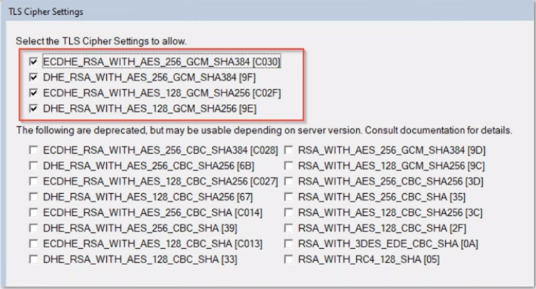
Note: Sametime 12.0.2 finally supports current ciphers by using a current OpenSSL Version. No weak Cipher configuration is needed for LDAPS connections.
Dependencies updated
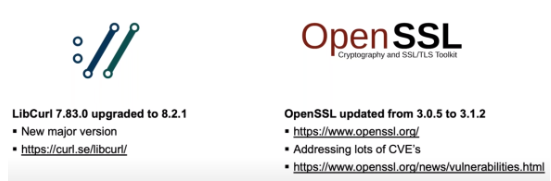
Security Improvements
-
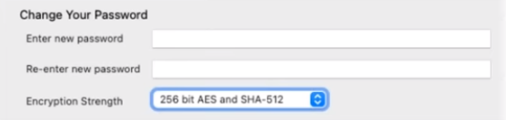
Security policy for ID file encryption
-
Set a policy to upgrade the algorithm used to encrypt the ID file to AES-128 with SHA-256 or AES-256 with SHA-512, when changing the password
-
SHA256 support for Internet password in Domino directory
-
With Domino 14.0, users’ password hashes will now be updated to SHA256 when they change their Internet passwords in the Person Document.
-
Fixed several CVE’s and backported to 12.0.2 FP2
-
CVE-2023-28010 https://support.hcltechsw.com/csm?id=kb_article&syssparm_article=KB0107388
-
CVE-2022-40151 https://support.hcltechsw.com/csm?id=kb_article&syssparm_article=KB0 106542
Domino 14 on Windows
-
Major Security change – Run as normal user instead of admin
-
On UNIX the server was always running with a “notes” user instead of the root user!
-
Instead of a local system account by default “NT Authority\LocalService” is proposed
-
Switch back to the system account by changing back the service still supported but not recommended
-
Data directory permissions and service settings are automatically updated
-
Take care: Additional directories (translog, DAOS, NIFNSF & FT) are not automatically updated!
-
Running with a nine admin user needs file system permissions to fit
-
Only data directory is updated automatically
-
Transog, DAOS, FT, NIFNSF might be on separate disks and need an update. Your server will crash at stratupb without translog permissions!
-
Either use the file explorer to change the settings or use the command line.
-
Tip: Run an interactive session to check permissions
-
psexec -i -u “nt authority\localservice” cmd.exe (sysinternals tool)
Domino Security – Inbound disclaimer
Inbound Mail Disclaimers
-
Tag/mark external messages for security reasons
-
Domino V14 introduces subject and body mail disclaimers
-
Inbound SMTP disclaimers are usually configured on external gateways receiving SMTP mail
-
If the message is encrypted or signed, the notification is only in the subject
-
Inbound disclaimer text is specified in the server configuration document
-
Internal messaging gateways usually don’t need to add inbound disclaimers (e.g. scanners, internal application servers,…)
Inbound Mail Disclaimer Configuration
-
Configuration in Configuration document
-
Router/SMTP -> Restrictions and Controls -> SMTP Inbound Controls -> External Email Notifications
-
Flexible configuration
-
External only or all domains
-
Where to add the text subject/body
-
HTML format
-
Exclusion for hostnames/IPs
-
Subject modification if the message is signed to avoid breaking the signature
-
A limited number of chars for subject (30) and body (4096)
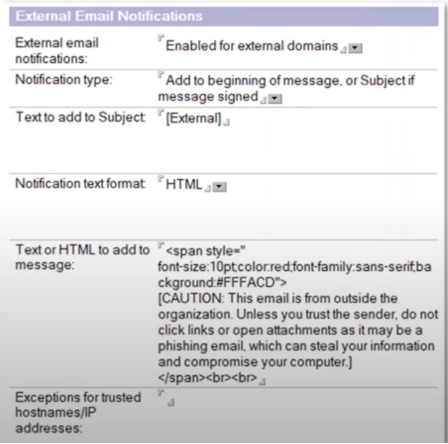
Inbound Mail Disclaimers
Recommendation:
-
Use Subject tagging
-
It allows one to identify messages before opening them
-
Do not add a disclaimer to mail body
-
This will modify the mail body (the content of the mail)
-
Be aware of SPR # KSAUCYUC79 ->Hotfix is available. Mail is not getting delivered when there are two or more recipients, and when “External email Notifications” feature is enabled.
Federated Login Enforcement
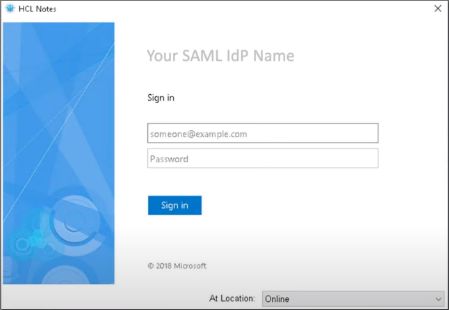
The Notes Client can be configured against a federal login meaning that instead of typing your Notes ID file password you are providing your ADFS credentials.
You now have the option of having NFL mandatory by setting this variable:
Notes.ini Make NFLMandatory=1
Let us know which security features you find most useful. Don’t hesitate to contact us if you have any issues with Domino V14, we are happy to be of service.
Filed under hcl domino