
Domino SSL Guide: Implementation & Renewal Made Simple
With the industry standard limiting SSL/TLS certificates to a one year expiration date, a streamlined approach is needed now more than ever to keep your sites secure. At Collabsphere 2023, our very own Avery Shaffer did a great presentation on SSL implementation and renewal so let’s explore the key point of it.
Why is SSL a pain now?
-
Higher security with frequently changing certificates
-
Newly released security features are updated faster (i.e SHA1 to SHA2)
-
Exposed or compromised key chains removed quicker
-
The “correct” theory that if we keep changing the certificates, the site can’t be hacked
Who?
-
In 2015 the CA/Browser Forum voted to reduce certificate validity from 5 years to 3 years.
-
In 2019 they voted again to reduce certificate validity to 1 year but the vote failed.
-
Apple decided independently to only allow 1 year SSL validation for Safari browsers, everyone following suite.
Future Change
- Google is pushing for maximum 90 day SSL key expiration by the end of 2024
While this 3 year validity already is a nightmare for admins, a reduction to 90 days will only make things worse.
One of the things that you do need to pay attention to when working with SSL keys is that uniformity is important as the entry is in several critical places: Internet Site Documents, Internet Ports, SMTP, LDAP, IMAP etc.
We would not recommend changing the name since there are several places where you will need to change that name and it will create extra hustle for you.
Also, if you miss only one, the whole thing will break, meaning even more work for you with restarting the server.
SSL Purchase and Renewal
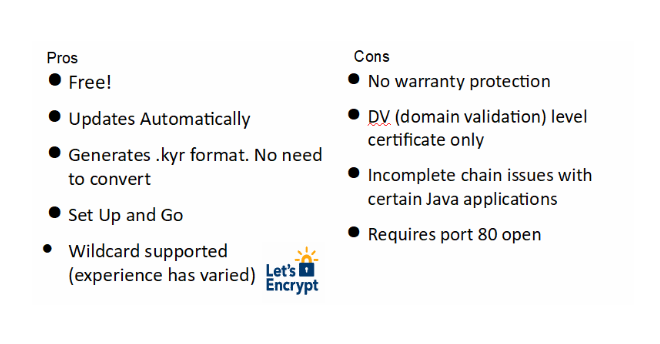
There are two ways to acquire an SSL for Domino: you can either use Domino’s built-in Let’s Encrypt or you can purchase an SSL from a third-party provider. Each of those has its own pluses and minuses.
Let’s Encrypt
Paid Certificate
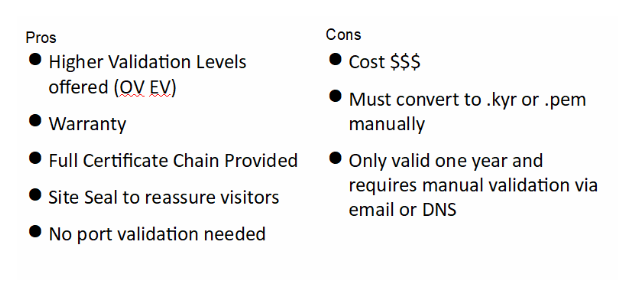
Purchased SSLs
Where to buy SSL keys:
DNS Registrar
-
Can install keys for you if site is hosted by them
-
Generates the .csr and .key for you. The .key is very important since that is the thing you will need to generate all your certificates. So, if you request it they will put it on your website and you can take it and put it on your Domino server. So, make sure you get that .key because it’s important.
SSL Specialty Sites
-
Can purchase multi-year for cheaper (SSL still expires in one year). A note here, it will still expire after one year; you will need to click the Approval button again.
-
Can pay extra for installation assistance
Managed Hosting Providers
-
Handles the whole process for extra cost
-
Receive certificates in all formats needed
-
Can Install on Domino environment for you
Generating your .csr and .key
Server Certificate Administration
We would not recommend you use this for the following reasons:
-
Does not support key size above 2048
-
Keyfile.key buried in Domino server
-
Template not available on modern Domino installations
OpenSSL
-
Continuously updated
-
Supports key size 4096
-
Can generate .kyr as well as convert certs to .pfx .p12 ect
-
Knowledgebase article:
-
https://support.hcltechsw.com/csm?id=kb_article&sysparm_article=KB0073175
Consistent Validation
Here is a pro tip from us in order to make your life easier: set up a mail-in database with just the basics because every paid version of SSL will ask you for an email adress. That way you don’t have to worry about people leaving, changing their emails etc. You don’t get a choice in who you put input it pulls from the Whois document so it pulls it from the technical contact for example. So in order to avoid any trouble just use a generic one mailing database to get your mail validation.
-
Stop the headache of single user validation
-
People leave, emails change
-
Streamline validation with a generic email and mail-in database
Installation Of Purchased Key Domino 9-11
-
Notes 9.0.1.3 to 11 can utilize the keyring/kyrtool https://support.hcltechsw.com/csm?id=kb_article&sysparm_article=KB0073172
-
Command line tool to view, create and import certificates to .kyr format
-
Kyrtool installs with Notes 11 out of the box
-
Notes/Domino 12 switch to Certificate Manager!
Certificate Manager
The introduction of Cert Manager meant no more .kyr if you don’t want to.
-
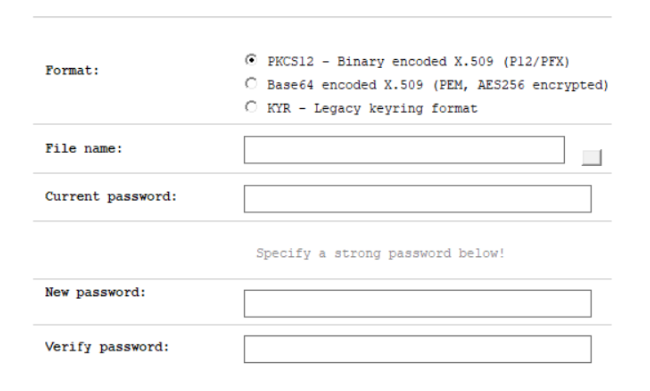
Certificate Manager can import .pem, .p12 and .pfx formatted keys
-
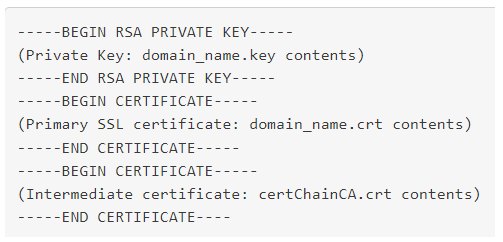
Simple as copy/pasting certificates in .pem format on a notepad and upload
-
Replicated DOMAIN WIDE! Huge deal for when 90 day keys are implemented for wildcard certificates.
Let’s Encrypt!
-
Automated certificate management for Domino 10 and 11
-
Two part streamlined installation on OS and Domino
-
Supports Linux and Windows OS
-
DSAPI filter entry required on Internet Site document
-
Requires program document and http restart to update certificate chain
-
Certificates stored in data directory as .kyr/.sth
-
Server restart usually clears any renewal errors
-
Test connection with staging setting before automating
-
Certificate requests are limited and you will get timed out!
Certificate Manager
-
Native automated certificate management for Domino 12
-
One line Administrator command for installation
-
“load certmgr”
-
DSAPI filter entry required on Internet Site document
-
Requires a server task entry to ensure the task runs on startup
-
Set config ServerTasks=Replica,Router,Update,Amgr,Adminp,Sched,CalConn,RnRMgr,HTTP,LDAP,Certmgr
-
Replicated DOMAIN WIDE! Huge deal for if 90 day keys are implemented
-
Note: TLS credentials cannot be exported. The .key is encrypted
-
Workaround in Domino V12 Certificate Management slides linked at the end
Cipher Security by Domino Version
SSL Labs
It’s a fantastic free tool for testing your site security which you can use for checking:
-
Certificate Chain
-
TLS Protocols Enabled
-
Ciphers
-
Handshake Simulation
You can find this great tool here: https://www.ssllabs.com/ssltest
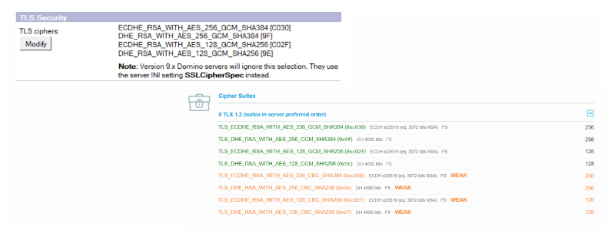
Here are the results of a scan performed by us. You can see that things can be improved.
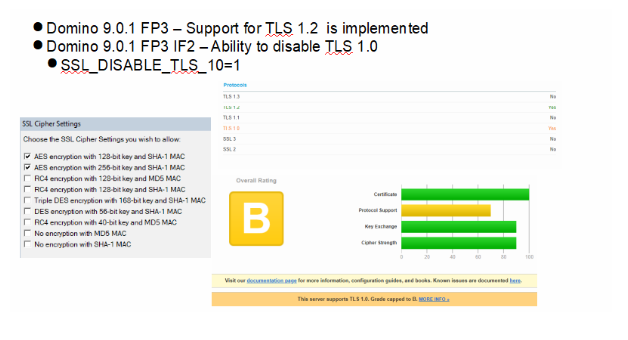
Once we selected them all, this is what came out on Domino 12.0.1; it depreciated all the old ciphers except for 4.
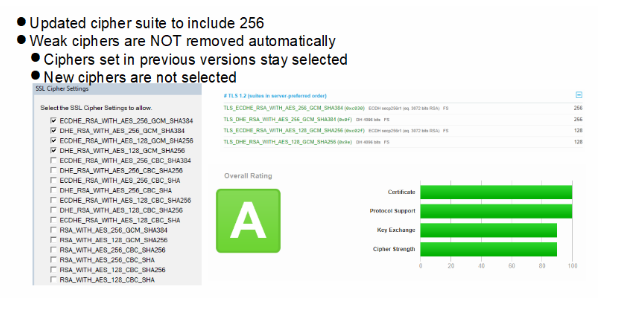
Also good to know is that Domino 12.0.2 deprecated most weak/outdated ciphers and
Domino 12 disables TLS 1.0 by default.
If you have made all changes but are still receiving an A in SSL Labs, HSTS is the answer! It was added on version 9.0.1 FP3 IF2.
This protocol is used to prevent man-in-the-middle attacks, downgrade attacks and cookie hijacking but it’s implementation comes with an error preventing that coveted A+
To resolve, add HTTP_HSTS_MAX_AGE=63072000 and HTTP_HSTS_INCLUDE_SUBDOMAINS=1 (for extra security) to the notes.ini.
Check out Darren’s blog for more info:
https://blog.darrenduke.net/darren/ddbz.nsf/dx/domino-adds-hsts-to-its-security-arsenal.htm
One other note is that TLS 1.3 is currently not supported by any version of Domino.
HCL has stated it is on the roadmap,but we have no current release date as of now.
Bonus Tips!
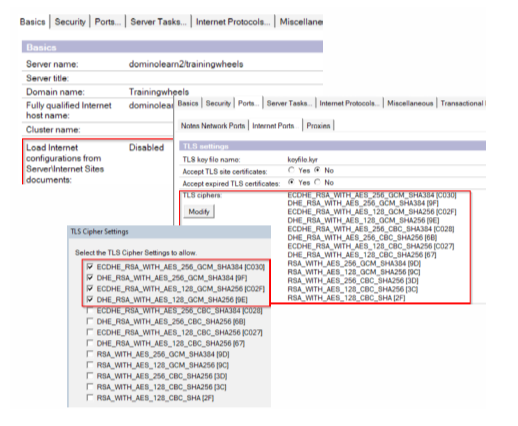
If after you have checked and cleaned up your ciphers you still get this error:
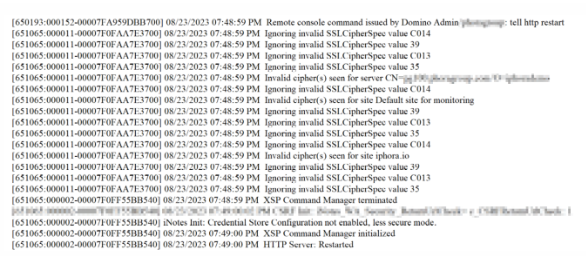
Make sure you check the hidden views because most likely that is where the trouble is.
So, Configuration → Current Server Document to disable Internet Site Documents then save
Ports → Internet Ports → TLS Ciphers
To achieve an A+ in SSL Labs disable all but the top four.
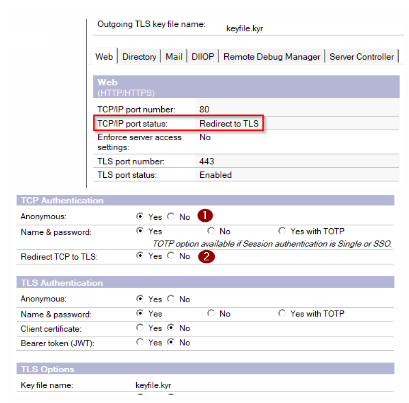
Certmgr – Port 80 Error
-
Certmgr auto renewal requires port 80 to be open
-
Settings that redirect traffic to 443 will break this process
-
Setting Anonymous access to no will also break auto renewal
Utilizing A Purchased SSL Key For Nomad
-
As of Domino 12.0.1FP1, HCL Nomad can be installed directly on the Domino server instance
-
During the initial set up, Nomad will look for/install Certmgr and create a nomad.
.com entry -
To utilize your own purchased certificate, install Certmgr and set up nomad.
.com prior to installation. -
This is not a requirement just a way to skip the extra step of having to modify/recreate the entry
Ciphers Not Updating After HTTP Restart
If no matter what you change your Domino ciphers to does not reflect in SSL Labs,
Check for proxy and passthru servers in the environment that may be handling Encrypting the traffic.
Certificate Manager Renewal Deterred by Redirects
-
Redirect Rules can interfere with certmgr renewal, throwing a port 80 connection error
-
Workaround – Temporarily disable Internet Site Documents → restart http → re-run the renewal
-
Yes, this will break the auto-renew feature while the redirect is in place
We recommend you also watch the recording of Avery’s presentation, it’s filled with lots of fun and animal images. 🙂
For any of your SSL trouble, Prominic is just an email away, so let’s talk and see how we can help you.
Filed under compliance, cybersecurity