
Domino 12 Certificate Manager with Let’s Encrypt Explained

Domino V12 Certificate Manager is a feature of this latest version that , that works with a new database, Certificate Store (certstore.nsf) to manage TLS certificates in your Domino environment. During CollabSphere 2021 Heather Hottenstein and David Hablewitz did an in-depth review of its capabilities.
WHAT IS A CERTIFICATE?
Certificates represent a way of giving your website a lockin so that people will know that they are talking to who they think they are talking to when they are connected to that website.It makes it harder for people to spoof those websites and it provides a way to communicate securely between each end.
A turning point in certificates was October 2014 with the attack of the POODLE virus. IBM came out with FP3+ which included several components: sha 256, TLS, OpenSSL, kyrtool.
DOMINO CERTIFICATE MANAGER GOALS
Here are the goals that the Domino Certificate Manager has:
-
Simplify Domino certificate management
-
No external tools like OpenSSL command-line to create keys and convert certificates needed
-
Replace difficult to handle .kyr files with standard .pen format
-
Full Let’s Encrypt / ACME CA integration
-
Simplified flows for external certificate authorities
-
Domain wide secure and automated deployment for “TLS Credentials”
-
Automated update of certificates including automatic cache update in internet server tasks
-
Support modern standards like ECDSA in addition to RSA
DCM Components
The first component of Domino Certificate Manager is New Server Task:
-
Runs on one server in a Domino Domain
-
Domino V12+
-
Docker, Windows or Linux
Load Domino Certificate Manager
ServerTasks=Update,Replica,Router,HTTP,CertMgr
The second part is composed of certstore.nsf
-
Created when certmgr is loaded for the first time
-
directory profile lookup
-
creates replica when loaded on other servers
-
Domain wide replica
-
Replica ID based on names.nsf
-
Request, store and distribute certificates
-
Domino V12+
-
Private keys are protected by 256 bit AES encryption
-
Replicate frequently
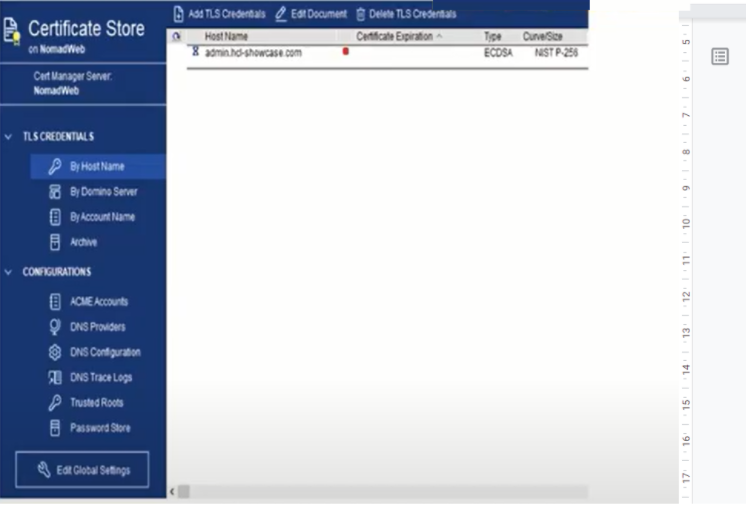
Global Settings document
-
Created when the db is created
-
Defines default values for TLS Credential documents
-
Defines Admin server – this is not to be edited.
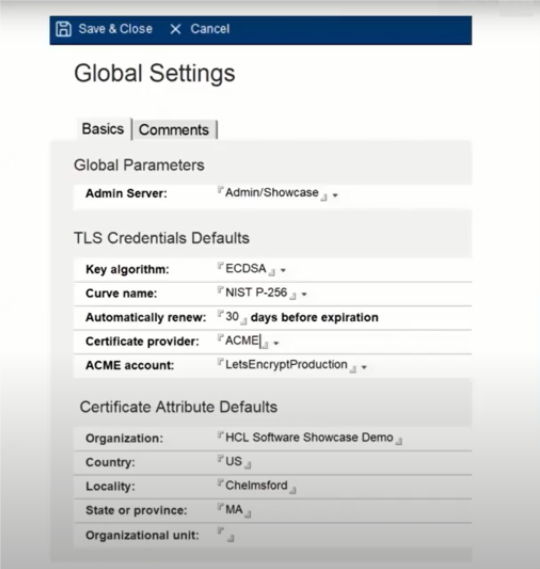
The TLS Credentials document provides your Domino server with its certificate information that it can use for encrypting HTTP, browser traffic, HTTP communications, etc. This document replaces the .kyr file and it is stored in a PEM format.
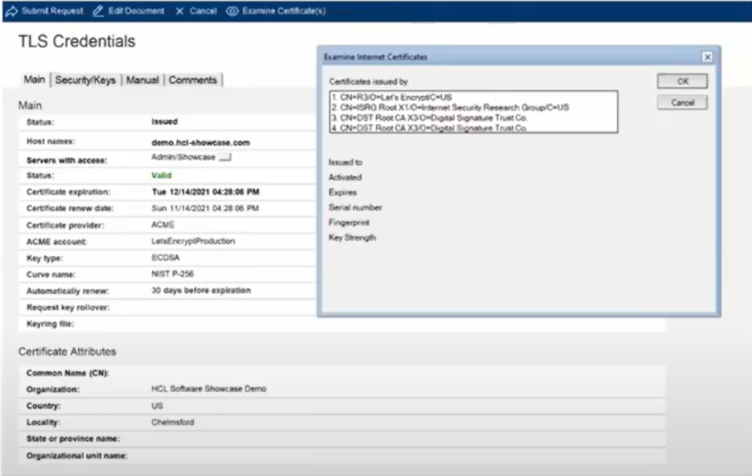
Let’s Encrypt
Let’s Encrypt represents an automatic certificate management environment; it simplifies the certificate process where you can have all of it happen in the background.
Here are some other great features:
-
It’s free for SSL/TLS certificates
-
It’s fully integrated into certstore.nsf and CertMgr
-
Easy to deploy
-
Automatic certificate update (request) and deployment (reload on server)
Architecture Diagram
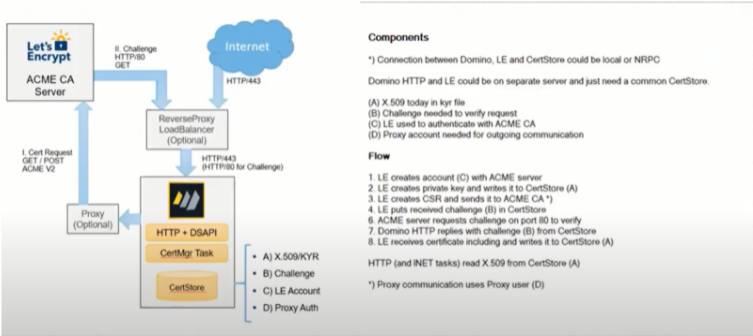
ACME HTTP-01 Challenges
-
How it works:
-
ACME server sends a challenge to ACME client
-
ACME server will ask via in-bound HTTP port 80 for the “secret” at a well-known URL
-
DSAPI Filter “certmgrdsapi” needs to be enabled in server doc / internet site!!
-
TIP: load cermgr -c adds the DSAPI filter to server doc – Internet sites need to specify manually
-
If the server is configured to only allow authenticated connection configure public URL
-
Notes.ini: HTTPPUBLICURLS=/.well-known/acme-challenge/:/redir.nsf/:/MFASetup*
-
Again: Inbound HTTP port 80 required!
-
If the server is not reachable by the ACME server (e.g. Let’s Encrypt), the challenge fails!
-
Tip: Inbound connection can be a proxy connection
notes.ini Variables
-
CertMgr_Interval= n
-
Interval between processing requests, default 30 seconds
-
tell certmgr process – skips wait time
-
CertMgr_ReplicationInterval=n
-
certstore.nsf replication interval, default 120 seconds
-
CertMgr_HealthCheckInterval=n
-
Interval for certificate health, default 30 minutes
-
CertMgr_CompactFreeSpace=n
-
Compacts when certstore.nsf has specified percentage free, Default 50%
-
CertMgr_CompactDays=n
-
Compacts database when not compacted in specified number of days, Default 30
One great thing about Certificate Manager is that it can perform all the health checks you need, ensuring that you are safe. It will:
-
Automatically check for requests
-
Report certificate health
-
Run every 30 minutes and on demand
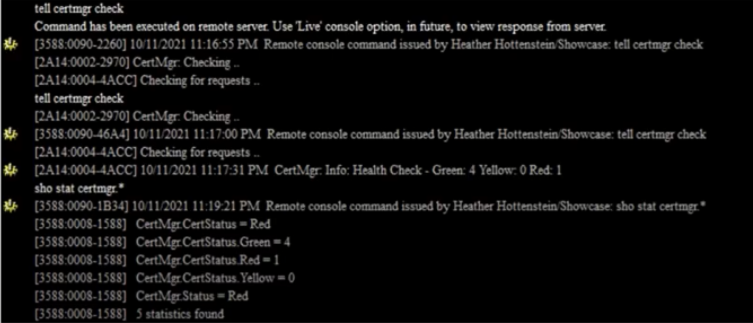
Load Certificate Manager
Moving the Certificate Manager
-
DO NOT modify the Global Settings document
-
New Domino server Certificate MAnager requirements
-
Domino V12+
-
Same Domino Domain
-
Replica certstore.nsf
-
tell certmgr shutdown
-
load certmgs – MIGRATETOSERVER servername
The Certificate Manager does a dry run to ensure there are no errors then actually processes creating new certificates and updating the configuration.
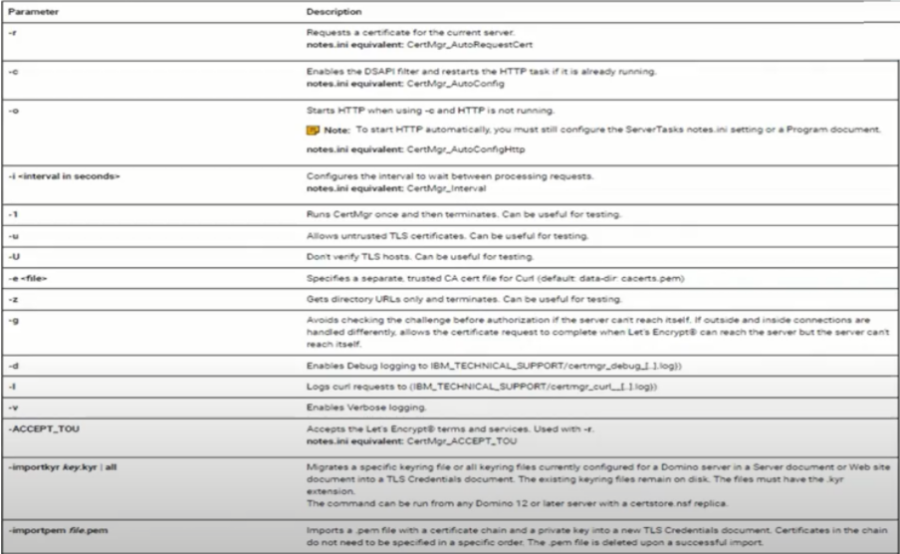
Here are some tips for when you will need a hand with Troubleshooting
-
load certmgr -d
-
Debug information written to IBM_Technical_Support\certmgr_debug_[…].log
-
load certmgr -l
-
Curl request information written to IBM_Technical_Support\certmgr_curl_[…].log
-
load certmgr -v
-
Verbose logging, log.nsf
-
load certmgr -z
-
Gets the ACME URLs, test Internet connectivity
New TLS Cache
-
.kyr files have been managed by the KYR-Cache reading .kyr files from disk
-
New TLS Cache reads TLS Credentials directly from certstore.nsf
-
TLS Cache sits in the SSL layer below internet protocols processes (e.g. HTTP/SMTP)
-
Support for RSA and ECDSA keys in parallel
-
Support for wildcard certificate lookups
-
Automatic on the fly certificate reload: when added or updated
-
Also manages trusted roots and OCSP cache
Keep in mind that the keyfile name field is still very important.
-
The keyfile name in the server document and internet site is still triggering SSL
-
It defines the default TLS Credential for the server
-
It is also used when the server acts like a client (outgoing secure SMTP)
Here are some best practice advice:
-
Specify Domino server’s host name you have a certificate for
-
Or specify keyfile.kyr in the server document / internet site document
-
Have “keyfile.kyr” in the default TLS Credentials document tagging an RSA key as default
-
Not only for HTTP – important for SMTP, LDAP, POP3, IMAP.
Certificate Manager and Domino 12.0.1
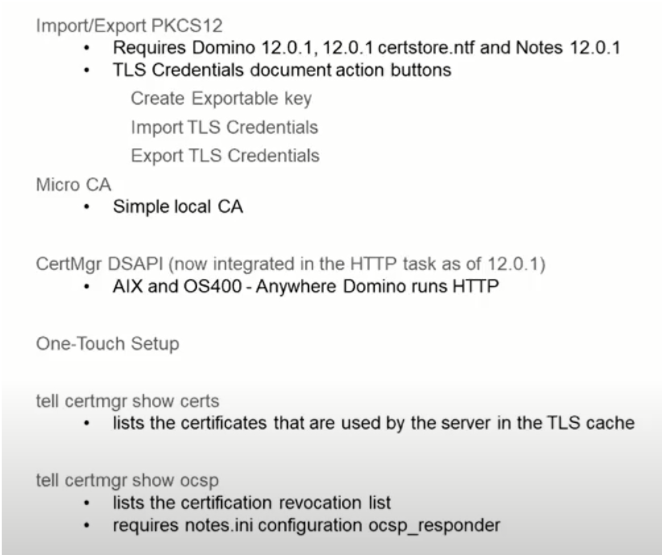
The new Domino Certificate Manager is doing quite a great job in helping admins manage their certificates. If you need any help, just send us an email and we will be happy to help.
Filed under business practices, hcl domino