
Best Practices for Upgrading to Domino v11 – Webinar recap

HCL keeps up the good work with some great webinars; this time we will talk about some best practices for upgrading to HCL Domino 11.
First steps
Here are the things you need to keep an eye on when considering upgrading to HCL Domino V11:
-
Baseline monitoring: Understand the current workloads
-
Evaluate your environment: Upgrade-in-place or new hardware?
-
Deployment sequence: set the steps’ order to upgrade your environment
-
Prepare the environment: what you need to do before you upgrade
-
Application updates: how to handle your custom apps.
Here are some great features that were released since 9.0.1:
-
The file size limitation of 64GB is now 256GB
-
Deleted document logging
-
Symmetrical Clusters
-
SAML Improvements
-
Domino on Docker
-
Marvel Client is included
-
Security Improvements
-
Authenticating web users against Notes ID passwords in ID Vault
-
Subject Alternative Names Certificates
-
Server Name Indication (SNI) support
Baseline Monitoring
For a better view let’s dive into the steps that need to be taken when upgrading to HCL Domino V11. Baseline monitoring is not necessarily something that you do just when you consider an upgrade but it’s a great practice on an everyday basis. It can help with:
-
Identifying pre-existing conditions and problems
-
Predicting problems before they happen, validate tuning
-
Comparing before and after the upgrade
-
Planning for capacity: especially useful when moving users or consolidating servers
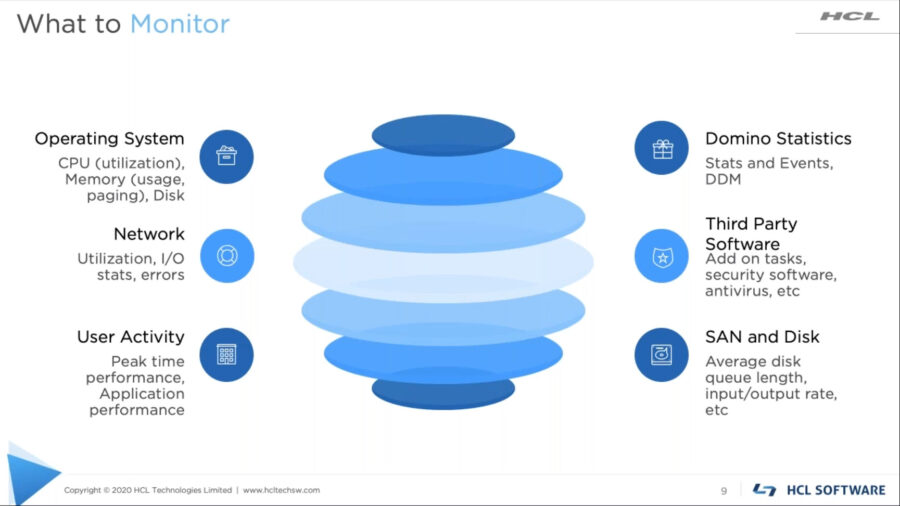
You will need to monitor the following:
-
Interpret/analyze the data and create baselines for your current environment:
-
What are the typical operating parameters for your servers?
-
What is the data telling you about your environment?
-
Create daily/weekly/monthly reports based on your baselines.
-
Create a remediation process to address results that exceed baselines.
All this will help you create a plan and be prepared in case something goes wrong. Identifying issues before they become problems is also a great practice to help keep your servers healthy.
Luckily, there are some tools that help you get the job done:
-
Domino Domain Monitoring
-
Domino Statistics
-
SNMP Agents
-
Third-party tools specific to the job (Panopta)
-
OS tools: Parfmon, nmon, etc
-
Hypervisor stats (VMWare vSphere, etc)
Evaluate your environment
After you are done with the monitoring, the next step would be making sure that you evaluate your environment.
If you have Domino 9.0.1 and 10.x things are rather straightforward. Domino 9.0.1 environments can skip version 10 and upgrade right to 11.0.1.
With versions prior to Domino 9 you will need to:
-
Confirm Domino is supported on your OS
-
Uninstall the version that is installed
-
Reboot the machine
-
Clean up the notes.ini (start with a new one, or remove obsolete settings)
-
Install 11.0.1 and point the installer at the existing directory structure
When it comes to evaluating the existing environment you’ll need to start with the Operating System and Hardware Requirements:
-
Only 64bit servers are supported
-
For physical hardware, consider upgrading the latest drivers and firmware
-
Check if your hardware is out of support
-
Check if you need more or different storage
-
Check if you can consolidate
-
See which third party products are in use and if they are supported on Domino 11
Some things that need to be taken into consideration when moving from 32-bit to 64-bit:
-
Plan, the update process will take more time. This will happen once during the upgrade
-
all existing full text indexed will be discarded and rebuilt
-
all existing views currently built will be discarded and rebuilt (Windows)
-
Windows Server
-
Don’t install 64bit Domino code into the 32-bit program directory
-
Remove files from SysWow64 directory
-
Check the notes.ini settings
-
Use a new notes.ini (if possible)
-
Migrate txn logging settings
-
Tuning and constraints pertaining to 32-bit systems
-
Java Heap size
-
Constrained memory pools
You have two versions of HCL Domino V11: 11.0 and 11.0.1. There are some features available across versions:
-
Subject Alternative Name (SAN) field in X.509 Certificates
-
SAN for TLS and S/MIME signature verification is only supported in the Domino 11.0.1 server and Notes 11.0.1 clients.
-
DAOS tier 2 storage
-
Requires the 11.0.X Domino Directory (NAB) design (pubnames.ntf) and 11.0.x credentials store design
-
Downgrading the design to earlier releases may disable your tier 2 storage
-
Directory Sync
-
Requires the administration server and client to be at 11.0 or higher, including the NAB design
-
Authenticating web/Http users against the Notes ID passwords in the ID Vault
-
Authenticating server and ID Vault server both must be 11.0 or higher
Clustering
Next in line comes clustering. You might know that it’s a good idea to keep the HCL Domino V11 servers in a separate cluster.
You can have a mixed version 10/11 environment while performing the upgrade because cluster replication does not restrict the replication of design elements. Also, Domino 11 Directory (pubnames.ntf) is backward compatible with Notes/Domino 10, while Other databases may cause problems on earlier Domino servers and clients.
If you have a Traveler environment you will need to upgrade Domino first. You can run Traveler on any version of Domino that Traveler supports. The latest maintenance level of the Domino server version is recommended as a best practice. If you upgrade Domino to a major version, you must re-run the Traveler installation to ensure correct binaries are in place.
Deployment Sequence
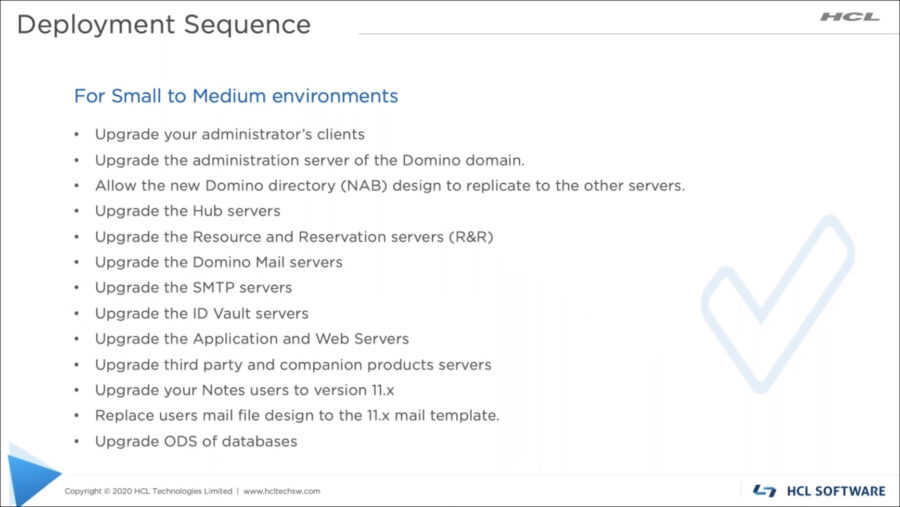
Moving to the Deployment Sequence, here are the steps you need to take when upgrading a small to medium environment (10.000 users or less):
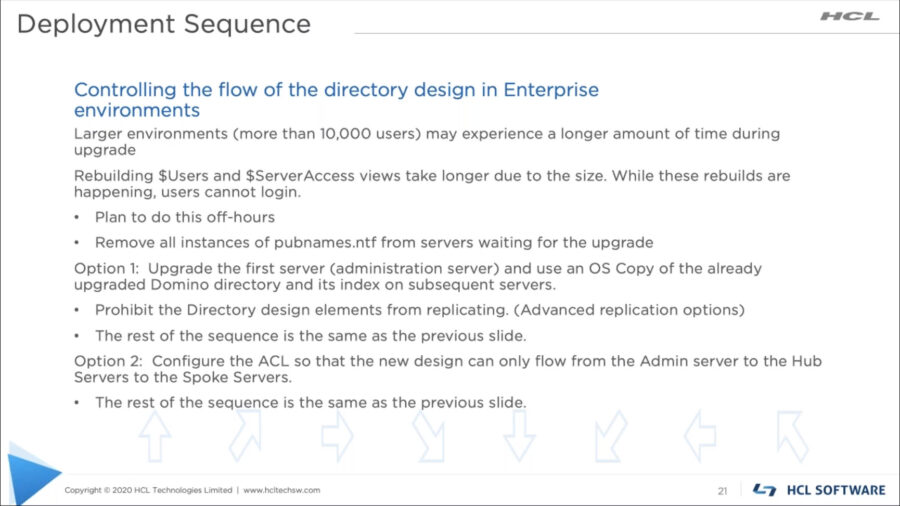
When it comes to Enterprise environments the deployment should look like this:
The next step will be determining the best path:
-
Do you need to make changes to your Domino infrastructure? Consolidate servers, add capacity?
-
Upgrade in-place (on same machine)
-
Move Domino to new hardware (keeping the identity)
-
Install new Domino server (inherit identity)
-
Install new Domino server (New identity)
The easiest approach for upgrading is the in-place upgrade. The server identity remains the same; so does hardware and OS. Upgrade over the top of your 9.0.1 server by running the installation program. You can do this only if your OS is currently supported by Domino.
New hardware, same identity
When talking about moving Domino to new hardware, things get a little more complex.
If the server is keeping the same identity (server.id, hostname, etc) but being moved to a new machine:
-
Bring down the current server.
-
Move all data to the new hardware to the same position (same file locations and directory structure) as the old hardware.
-
Domino program directory
-
Domino data directory
-
Domino transactional logs
-
Rerun install of the current version of the Domino server, point everything to the same file locations to mirror the previous configuration.
-
Shut down the old machine, change the hostname and network identity on the new machine to the original server hostname. Do not bring up the server on the old machine once the new one has been configured.
-
Confirm the server runs well under the new hardware. If all is well, then perform the upgrade in place.
Install new servers and switching the identity
Installing new servers, and switching the identity allows you to change underlying hardware and operating system and allows testing of the configured state before cut-over.
Here is an overview of the actions that need to be performed:
-
Build the new server independently
-
Create a new temporary server identity
-
Create replicas on a temporary server and keep in sync with the server to be replaced via replication.
-
At the desired time, switch server host, network and Domino server identities. The change is transparent to clients.
-
If clustered, you will repeat the process for each server and you should not add a temporary Domino server into the cluster.
Install a new server with a new identity
Benefits:
-
Change underlying hardware and OS
-
Test configured state before migrating users
-
Ramp up users slowly to not “overload” the new server
Important notes:
-
Mail users will require some migration to get them on the new server
-
Applications will need to migrate and be redirected from the old server
-
Clustered environments should have a new cluster, do not add to the old cluster.
Best practices
Document your server build – the choices that were made for configuration (including OS info). Review your security practices.
Notes.ini
-
For servers that are clustered, consider moving some of the notes.ini settings to a Server Configuration Settings document. This ensures that all servers get the same configuration.
-
Remove obsolete notes.ini settings
-
Find out if non-standard settings are still needed in Domino 11.
-
Review old tuning settings (caches, pools)
ODS
-
Use the latest ODS for Domino V11. It allows you to use the latest features. This should be done after the clients upgraded.
-
Ccreate_R10_Databases=1 (remove older settings)
-
Run compact -C on databases to upgrade the ODS.
Backup and Maintenance
Before you upgrade:
-
If you are virtualized, take a snapshot.
-
Make backups of all relevant files: ID files, notes.ini, system databases, applications, etc. Confirm these backups are reliable.
-
Make sure your server shuts down cleanly before upgrading
-
Perform fixup on databases before you upgrade:
-
Fixup -f (exhaustive – all docs), -j (include txn logged db), -v (exclude db views)
-
Temporarily increase the number of fixup tasks.
-
Using indirect files to perform maintenance can save you time
-
Enable inheritance on system dbs (names.nsf, log.nsf, event4.nsf and admin4.nsf)
-
Allows the Design task to refresh the design to the version 11 design.
Upgrading Applications – Best Practices
It starts with understanding which apps are used:
-
Which apps are used and who is using them?
-
The nature of the application: template based, integration points, connectivity, complexity
-
Current problems in apps
-
Document and prioritize any issues. Decide if they must be resolved prior to the upgrade
-
Choose the easiest ones first
-
Review the design and incorporate new features, if appropriate
-
Test your custom application on version 11 and confirm it still works
-
Check out the list of components removed from 11.X
-
JMV Change in Domino 11 (OpenJDK in version 11, replaces IBM JDK)
-
Directory structure changes in version 11
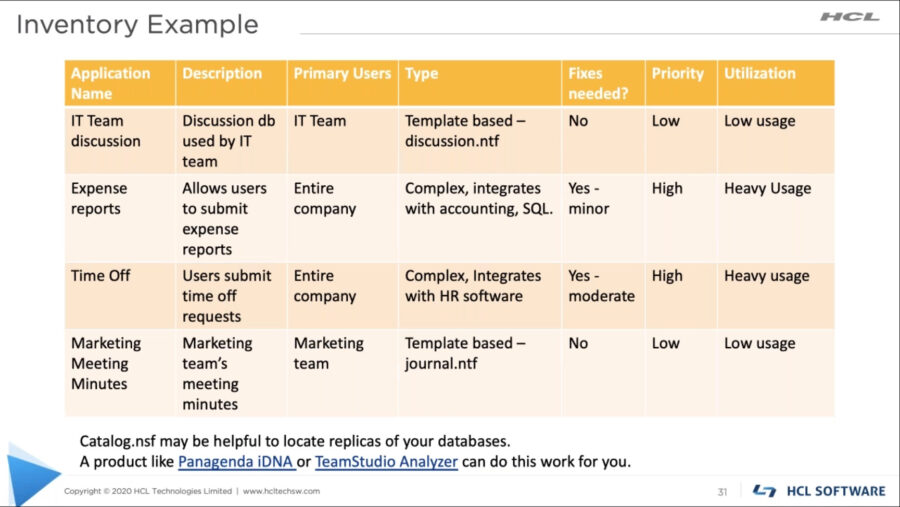
Here is and example of an inventory:
Test Environments:
-
Create a test environment that will mirror the desired architecture
-
Use Test IDs in a new Domain, configured like production
-
Hardware / virtualization should be the same as production
-
Incorporate decisions made thus far
-
Check copies of your applications and test them
-
Check out the list of components removed from 11.x
-
Upgrade ODS and test
-
Test out any customization you have made to the default templates
-
Enable some of the new features and test them
-
Enhance your security settings and test them with your applications
-
Test third party products (check notes.ini for extmgr_addins = and Server Tasks)
Pilot your upgrade:
-
Find a group of users to be in the pilot group (IT staff to strat)
-
Consider the standard desktop / OS build (is it locked down?)
-
Make sure they try the applications
-
Perform upgrades necessary for the pilot
-
Meet regularly with your pilot group to receive feedback
As always, the replay is available so make sure to check it out.
If you consider upgrading, the Prominic.NET team is here to lend a hand, so let’s talk .
Filed under hcl domino