
Enhance Domino Volt Apps with HCL Link v1.1.3 Integration

HCL Volt just got better with the coming of HCL Link 1.1.3. As you already know, Volt was designed to offer you a great tool for your low-code-development, while Link comes to lend a hand with all the integrations you might need.
HCL Link is:
-
A market leading data integration and transformation capability included in HCL Domino Volt
-
It runs on Windows, Linux and Docker
-
It can easily build connections to a myriad of data sources
-
It exposes services within Domino Volt so developers can easily integrate them into their apps.
HCL Link improves HCL Domino Volt because:
-
It offers an easy way to add to the Domino Volt Service Catalog
-
You get a no-code approach to integration
-
It manages the connection authorization
-
It let’s HCL Domino Volt developers build higher value apps
-
It greatly expands integration possibilities
-
It adds visibility into the use of services
-
It has the ability to do complex / multi step things
Here are some typical Use Cases
-
Read
-
Get info about employees
-
Information on customers and partners
-
Information on products
-
Spreadsheets on shared drives
-
Customer orders, entitlements
-
Location info
-
Write / Update
-
Updating a problem ticket
-
Updating a CRM record
-
Workflow approval notifies external system
-
Update commerce site
-
Messaging – linking from event to Unica or other marketing software.
Who works with HCL Link vs Volt
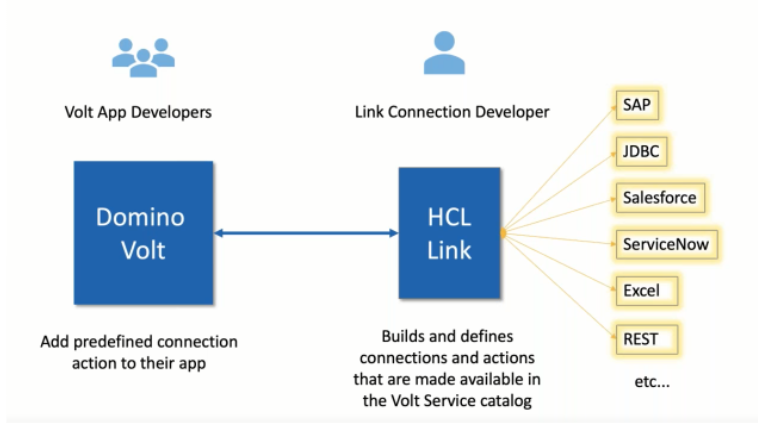
With Link you are creating a link server and the person that uses that server directly to build what is called connections and actions is probably going to be somebody in the IT department. It would need to be a person familiar with the data sources which you are integrating, it would be safe to assume that there will be fewer Link devs than HCL Domino Volt ones.
Requirements and Getting Setup
-
Install on:
-
Windows
-
Linux
-
Docker (install /build Docker images on Linux)
-
Can be on the same server or different from HCL Domino Volt
-
Be mindful of port conflicts if they are on the same server
-
Installing Link with https will require cert to be imported to Domino for HCL Domino Volt to see Link services
-
Settings in VoltConfig.nsf to set
-
The HCL Link server URL
-
HCL Link credentials
HCL Link Clients
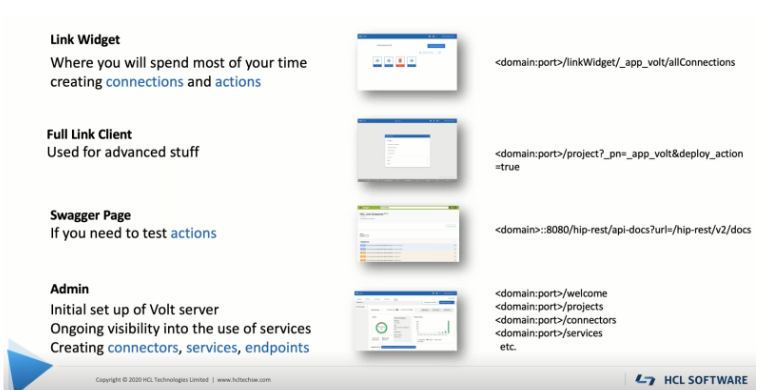
Building Connections and Actions
-
Connection – defines a data source and how to connect to it. e.g., Salesforce
-
Action – what you do with the Connection. e.g., Add Account, Get Account Details.
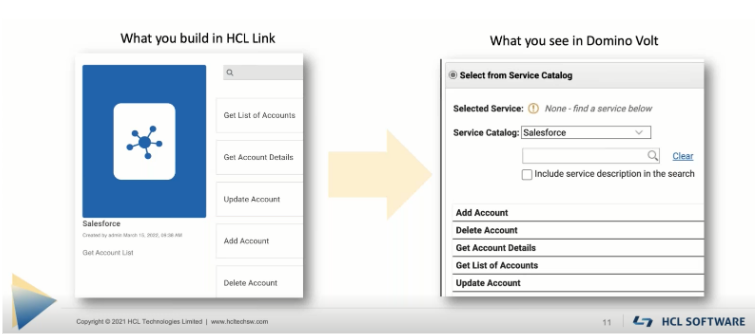
The webinar offered a great demo so make sure to watch it and check out HCL Link in action.
Building Connectors
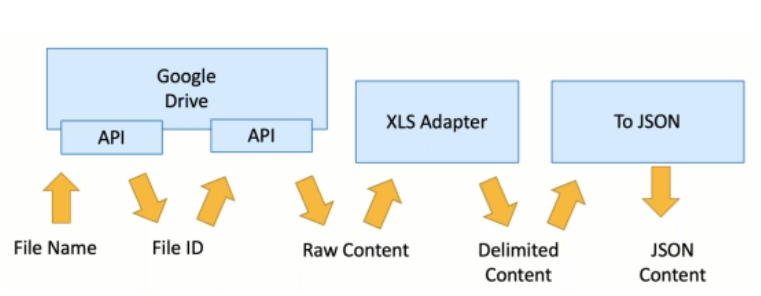
Consider the numerous steps involved with getting XLS data off a Google drive for use in HCL Domino Volt.
Here are the key aspects of HCL Link:
-
Link is included with HCL Domino Volt
-
You can build Connections / Actions to many different data sources
-
Connections / Actions are exposed in Domino Volt’s Service Catalog
-
The new version of Link v1.1.3 allows Domino Volt customers to take advantage of the product’s full data transformation capabilities
-
You can build Connectors for multi step integration
-
Connectors are exposed just like Adapters for creating new Connections and Actions.
If you need any help with HCL Domino Volt or HCL Link, just drop us an email and we will do our best to assist you with your low code development journey.
Filed under hcl leap